Veo Variations Experiment Guide
This application generates creative variations of a video concept and evaluates them technically using Nano Banana, Gemini, and Veo 3.1 Lite.
Architecture
Section titled “Architecture”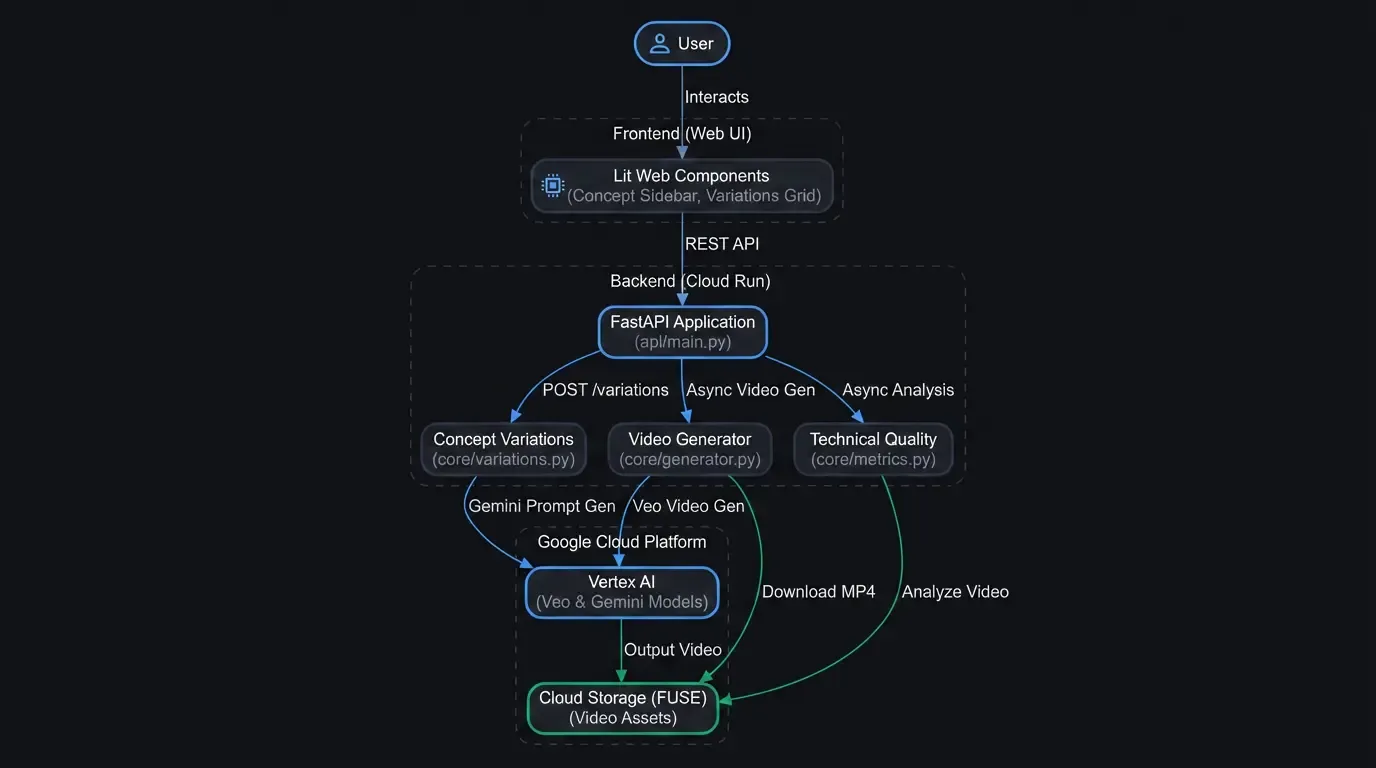
Project Structure
Section titled “Project Structure”- api/main.py: FastAPI backend that orchestrates the workflow.
- core/: Core logic for generation and analysis.
- generator.py: Veo video generation using the GenAI SDK.
- variations.py: Prompt variation generation using Gemini.
- metrics.py: Technical quality evaluation (NIQE) using pyiqa.
- c2pa.py: C2PA manifest extraction and summarization.
- ui/: Lit-based frontend (TypeScript).
- scripts/deploy.sh: Deployment script for Google Cloud Run.
- Makefile: Shortcut commands for local development and build.
Development Workflow
Section titled “Development Workflow”Local Development
Section titled “Local Development”- Install dependencies:
Terminal window make install - Setup environment:
Create a .env file from .env.template and edit it with your project details.
Terminal window cp .env.template .env - Start the API:
Terminal window make api - Start the Frontend (Dev mode):
In a separate terminal:
Terminal window make ui
Makefile Commands
Section titled “Makefile Commands”- make install: Installs both Python and Node.js dependencies.
- make build: Builds the production UI bundle into ui/dist.
- make api: Runs the backend with hot-reload enabled.
- make ui: Runs the Vite dev server for the UI.
- make clean: Removes temporary files and build artifacts.
Deployment
Section titled “Deployment”The application is designed to run on Google Cloud Run with Cloud Storage FUSE for persistent video storage.
1. Environment Configuration
Section titled “1. Environment Configuration”The deployment script (scripts/deploy.sh) automatically reads configuration from your .env file at the root of the project. Ensure the following variables are properly set in your .env file before deploying:
VEO_PROJECT_ID: Your Google Cloud Project ID.VEO_LOCATION: Your desired deployment region (e.g.,us-central1).VEO_BUCKET: The GCS bucket name for storing generated videos (e.g.,gs://your-bucket).
If you wish to deploy the application with Identity-Aware Proxy (IAP) protection, set USE_IAP=true and provide an EAP_GROUP (e.g., EAP_GROUP=my-team@example.com) either in the .env file or as environment variables when running the script. By default, the application is deployed with public access (--allow-unauthenticated).
2. Build the Production UI
Section titled “2. Build the Production UI”Before deploying, you must build the frontend so it can be served as static files by the backend:
make build3. Run the Deployment Script
Section titled “3. Run the Deployment Script”bash scripts/deploy.shNote: The script will:
- Create a dedicated service account if it doesn’t exist.
- Grant necessary permissions (aiplatform.user, storage.objectAdmin).
- Build and push the container image to GCR.
- Deploy to Cloud Run with IAP protection and GCS FUSE mounting.
Key Features
Section titled “Key Features”- Concurrent Generation: Generates multiple video variations in parallel.
- Technical Analysis: Automatically calculates NIQE scores for generated videos.
- C2PA Integration: Verifies and summarizes content credentials.
- Cloud Run + FUSE: Scalable deployment with direct file-system access to GCS.