Image Generation Arena & Leaderboard
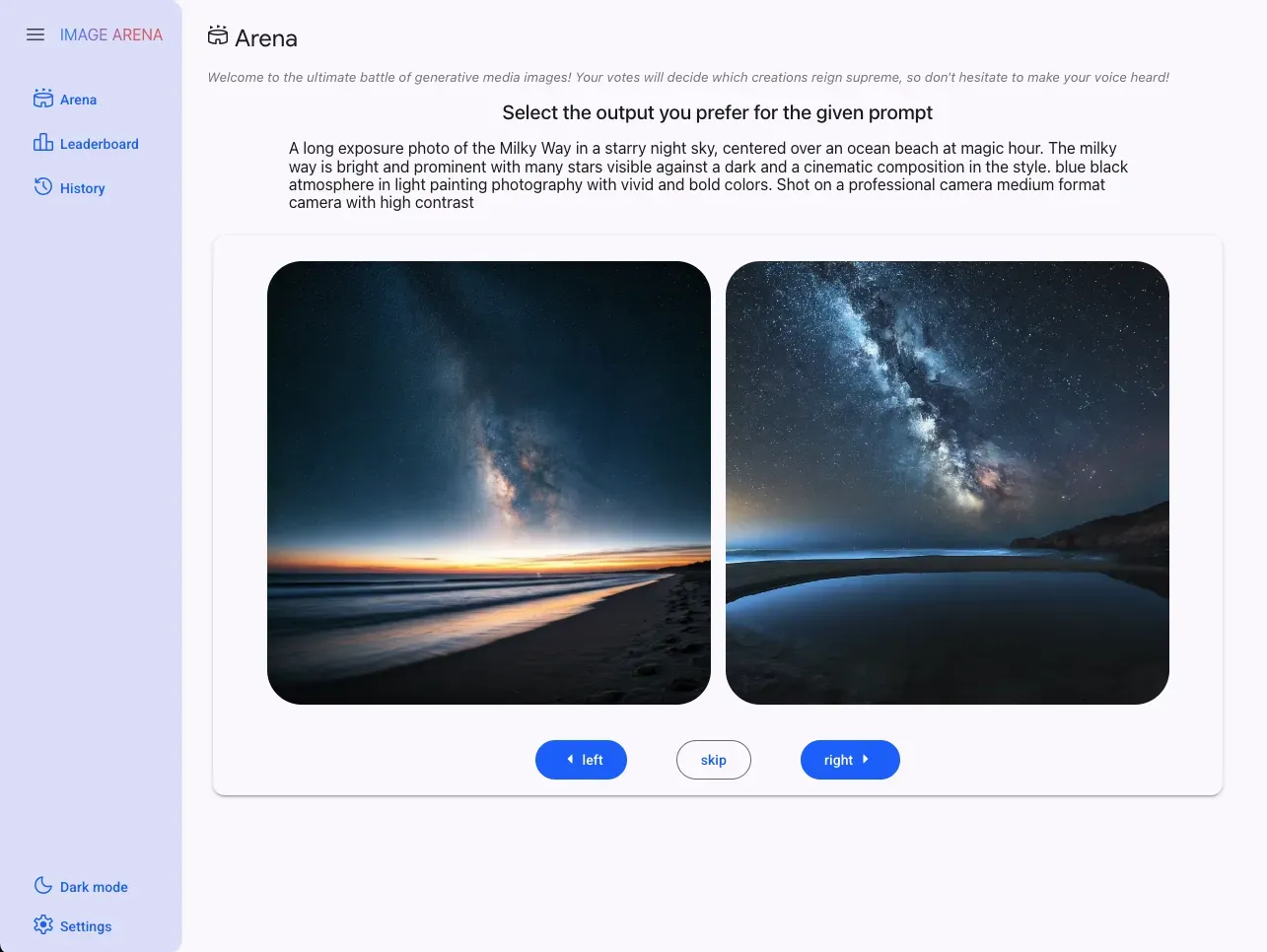

This is an example of an arena & leaderboard to compare different image generation tools.
It supports comparing images from a range of image generation models, including Flux1, Stable Diffusion, and Gemini image models (Nano Banana). Note that Imagen models were deprecated across Google, including Vertex AI, around August 17, 2026; use Gemini Image Generation (Nano Banana) as the replacement.
The application is written in Mesop, a python UX framework, with the Studio Scaffold starter.
Prerequisites
Section titled “Prerequisites”The following APIs are required in your project:
- Vertex AI API
- Dataform API
- Compute Engine API
- Cloud Storage
Python environment
Section titled “Python environment”A python virtual environment, with required packages installed.
Using uv:
# create a virtual environmentuv venv venv# activate the virtual environ,ent. venv/bin/activate# install the requirementsuv pip install -r requirements.txtCloud Firestore
Section titled “Cloud Firestore”We will be using Cloud Firestore, a NoSQL cloud database that is part of the Firebase ecosystem and built on Google Cloud infrastructure, to save generated image metadata and ELO scores for the leaderboard.
If you’re new to Firebase, a great starting point is here.
Go to your Firebase project and create a database. Instructions on how to do this can be found here.
Next do the following steps:
- Create a collection called
arena_images. - Create a collection called
arena_elo - Create an index for
arena_elowith two fields:typeset toASCandtimestampset toDESCand query scope set toCollection Group.
The name of the collections can be changed via environment variables in the .env file. i.e. IMAGE_COLLECTION_NAME and IMAGE_RATINGS_COLLECTION_NAME, respectively.
To verify your index has been created successfully, run the following command:
firebase firestore:indexes --database <DATABASE_NAME> --project <YOUR_PROJECT_ID>The output should look like this:
{ "indexes": [ { "collectionGroup": "arena_elo", "queryScope": "COLLECTION_GROUP", "fields": [ { "fieldPath": "type", "order": "ASCENDING" }, { "fieldPath": "timestamp", "order": "DESCENDING" } ] } ], "fieldOverrides": []}Cloud Spanner
Section titled “Cloud Spanner”Cloud Spanner is used to persist the ELO scores, per model, for each rating done into a table called Study.
IMPORTANT: As a prerequisite, create an instance of Cloud Spanner with 100 processing units from the Cloud Console. Instructions can be found here.
Next, change the following environment variables or use the default values already set in the .env.template file.
PROJECT_ID=<YOUR_PROJECT_ID>SPANNER_INSTANCE_ID="arena"SPANNER_DATABASE_ID="study"Now run the following script to create the tables and indexes.
python3 -m scripts.setup_study_dbBenefits of the Study Table
Section titled “Benefits of the Study Table”The Study table, designed to store Elo ratings for various models over time, offers significant benefits for understanding and analyzing the various AI models performance in the arena. It allows for interesting insights and queries to be extracted for further analysis. Some benefits are mentioned below:
-
Historical Performance Tracking: The inclusion of the
time_of_ratingcolumn allows for a comprehensive history of each model’s Elo rating. This enables you to see how a model’s perceived quality or performance evolves over time, potentially reflecting the impact of model updates, or changes in user preferences. -
Model Comparison Over Time: By storing ratings for multiple models in the same table, you can directly compare their Elo scores at any given point or across specific timeframes. This facilitates the identification of top-performing models and the tracking of competitive dynamics.
-
Contextual Analysis Through the
studyColumn: Thestudycolumn provides a crucial context for the ratings. You can categorize different evaluation sessions or experiments, allowing you to analyze model performance under specific conditions or within particular studies. For example,livegenerations vsbulkgenerations of images. -
Scalable and Queryable Data: Built on Cloud Spanner, the table offers horizontal scalability and strong consistency, ensuring you can store and query large volumes of rating data efficiently. The structured nature of the table allows for complex analytical queries.
Interesting Queries You Can Run
Section titled “Interesting Queries You Can Run”-
Track Elo Score Over Time for a Specific Model:
SELECT time_of_rating, ratingFROM StudyWHERE model_name = 'your_model_name'ORDER BY time_of_rating ASC; -
Compare Elo Scores of Multiple Models at a Specific Time:
SELECT model_name, ratingFROM StudyWHERE time_of_rating = 'specific_timestamp'ORDER BY rating DESC; -
Find the Average Elo Score of a Model Within a Specific Study:
SELECT model_name, AVG(rating) AS average_ratingFROM StudyWHERE study = 'your_study_name'GROUP BY model_nameORDER BY average_rating DESC; -
Identify the Model with the Highest Elo Score in a Specific Study Over a Time Range:
SELECT model_name, MAX(rating) AS max_ratingFROM StudyWHERE study = 'your_study_name'AND time_of_rating >= 'start_timestamp'AND time_of_rating < 'end_timestamp'GROUP BY model_nameORDER BY max_rating DESCLIMIT 1;
Types of Studies You Can Run
Section titled “Types of Studies You Can Run”The Study table is versatile and can support various types of studies focused on evaluating generative AI models:
-
Live Arena Studies: As you are currently implementing, this table can track Elo ratings derived from real-time user comparisons of model outputs. Each arena session or a series of sessions can be grouped under a specific
studyname (e.g., “live_arena_round_1”, “live_arena_round_2”). -
A/B Testing of Model Versions: You can run studies comparing different versions of the same model (e.g., “imagen-3.0-generate-001” vs. “imagen-3.0-generate-002”) on the same prompts. Each version would be recorded as a distinct
model_name, and the overall experiment can be identified by astudyname (e.g., “imagen_v1_v2_comparison”). -
Impact of Hyperparameter Tuning: Studies where you evaluate the effect of different hyperparameter settings on model performance. Each set of hyperparameters can be associated with a unique
study. -
Prompt Engineering Effectiveness: You can analyze how different prompting strategies affect the perceived quality of model outputs. Each prompting strategy could define a separate
study. -
Comparison Across Different Model Architectures: Evaluating the relative performance of models with different underlying architectures (e.g., “Imagen” vs. “Stable Diffusion”) within the same study.
-
Longitudinal Studies: Tracking the performance of a set of baseline models over an extended period to observe trends and identify potential degradation or improvement.
Application environment vars
Section titled “Application environment vars”Images are generated and stored in a Google Cloud Storage bucket.
The repository has a file named .env.template that you can use as a template.
IMPORTANT: Rename
.env.templateto.envand fill in your entries.
PROJECT_ID=<YOUR_PROJECT_ID>GENMEDIA_BUCKET=${PROJECT_ID}-genmediaGEMINI_PROJECT_ID=<YOUR_PROJECT_ID_WITH_GEMINI_API_ACCESS>LOCATION="us-central1"MODEL_ID="gemini-2.0-flash"IMAGE_FIREBASE_DB="arena"IMAGE_COLLECTION_NAME="arena_images"IMAGE_RATINGS_COLLECTION_NAME="arena_elo"ELO_K_FACTOR=32MODEL_FLUX1_ENDPOINT_ID=<YOUR_FLUX1_MODEL_ENDPOINT_ID> # This is the endpoint ID for the Flux1 model in Model GardenMODEL_STABLE_DIFFUSION_ENDPOINT_ID=<MODEL_STABLE_DIFFUSION_ENDPOINT_ID> # This is the endpoint ID for the StableDiffusion model in Model GardenArena app
Section titled “Arena app”Start the app to explore
mesop main.pyDeployment
Section titled “Deployment”Service Account
Section titled “Service Account”Create a Service Account to run your service, and provide the following permissions to the Service Account
- Cloud Run Invoker
- Vertex AI User
- Cloud Datastore User
- Storage Object User
export PROJECT_ID=$(gcloud info --format='value(config.project)')
export DESC="genmedia arena"export SA_NAME="sa-genmedia-arena"export SA_ID=${SA_NAME}@${PROJECT_ID}.iam.gserviceaccount.com
# create a service accountgcloud iam service-accounts create $SA_NAME --description $DESC --display-name $SA_NAME
# assign vertex and cloud run rolesgcloud projects add-iam-policy-binding $PROJECT_ID --member="serviceAccount:${SA_ID}" --role "roles/run.invoker"gcloud projects add-iam-policy-binding $PROJECT_ID --member="serviceAccount:${SA_ID}" --role "roles/aiplatform.user"gcloud projects add-iam-policy-binding $PROJECT_ID --member="serviceAccount:${SA_ID}" --role "roles/storage.objectUser"gcloud projects add-iam-policy-binding $PROJECT_ID --member="serviceAccount:${SA_ID}" --role "roles/datastore.user"
Deploy
Section titled “Deploy”gcloud run deploy genmedia-arena --source . \ --service-account=$SA_ID \ --set-env-vars GENMEDIA_BUCKET=${PROJECT_ID}-genmedia \ --set-env-vars PROJECT_ID=${PROJECT_ID} \ --set-env-vars MODEL_ID=gemini-2.0-flash \ --region us-central1Disclaimer
Section titled “Disclaimer”This is not an official Google project