Run, Veo, Run 🏃♀️📼
The ball is round. The game lasts 90 minutes. Everything else is pure theory.
Run, Veo, Run is a real-time, multimodal video generation experiment. It creates a branching narrative loop using Vertex AI Veo 3.1 for video extension and Gemini 3 for context awareness.
Inspired by the kinetic energy of “Run, Lola, Run”, the application features a techno-brutalist aesthetic designed for urgency and focus.
🌟 Features
Section titled “🌟 Features”- Timeline Extension: Upload or generate a clip, then extend it up through 30 seconds (5-7s segments).
- Advanced Generation Modes:
- Text-to-Video: Classic prompt-based generation.
- Image-to-Video: Animate a static start frame.
- Storyboard: Guide the video from a Start Frame to a specific End Frame.
- Ingredients: Use up to 3 Reference Images (Assets) to control style and character consistency.
- Model Control: Switch between
Veo 3.1 Fast(Speed) andVeo 3.1 Standard(Quality). Note: Ingredients mode requires Standard model. - Secure Playback: Uses Signed URLs to securely stream generated content from Google Cloud Storage.
🧠 Continuity Strategy: The “Analyze & Augment” Loop
Section titled “🧠 Continuity Strategy: The “Analyze & Augment” Loop”To preventing stylistic drift during extensions, the app employs a closed-loop feedback system:
- Analysis: After Veo generates a clip, Gemini 3 Multimodal analyzes the video to extract visual style, lighting, character details, and setting.
- Augmentation: When the user extends the timeline, this context is automatically appended to their new prompt (e.g., “She jumps over a car [Context: Cyberpunk, neon blue lighting…]”).
- Consistency: Veo receives both the pixel data (previous clip) and the semantic guardrails (augmented prompt), ensuring a coherent narrative flow.
🏗️ Architecture
Section titled “🏗️ Architecture”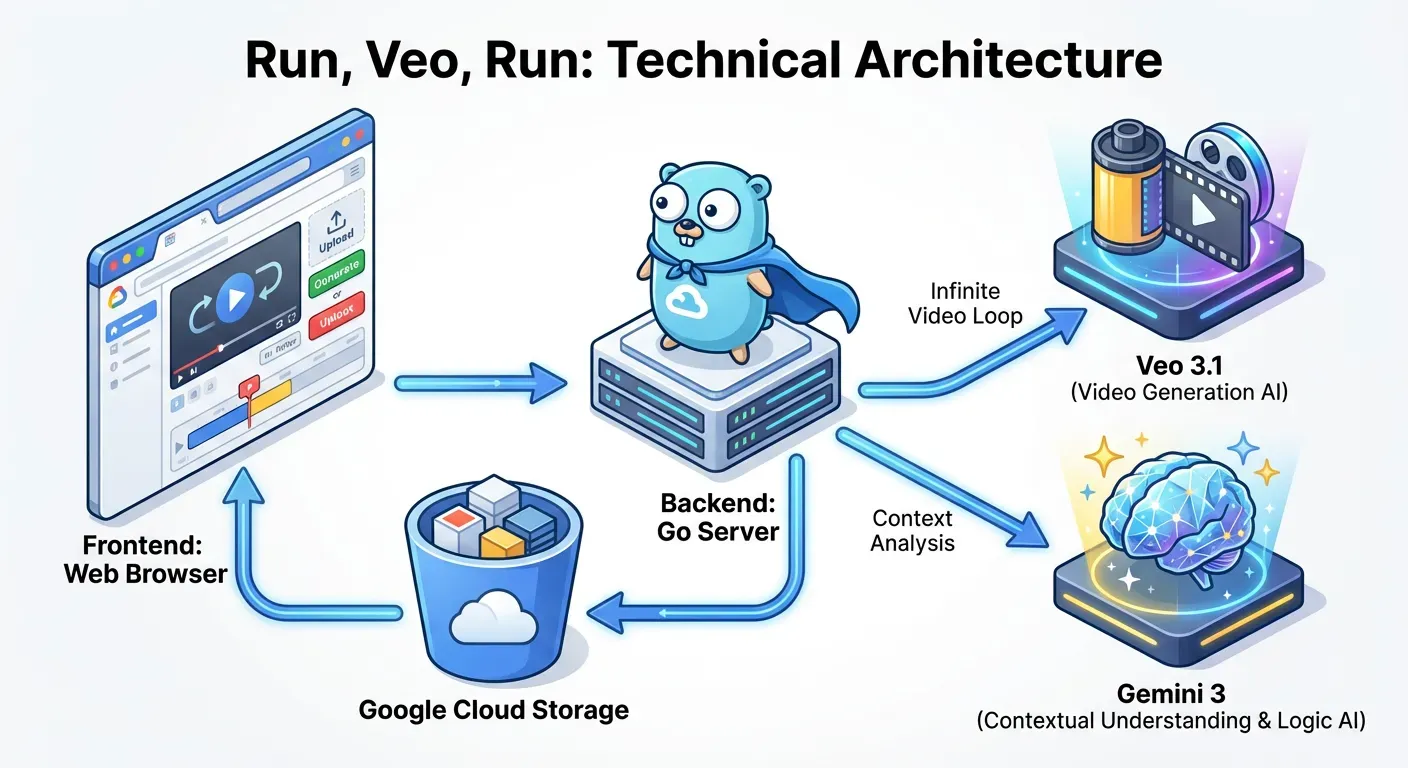
- Frontend: Lit WebComponents + Tailwind CSS (Techno-Brutalist Theme).
- Backend: Go (1.25+) acting as a secure proxy for Google Cloud AI and GCS.
- AI Models:
- Generation: Veo 3.1 (
veo-3.1-fast-generate-preview) - Analysis: Gemini 3 (
gemini-3-flash-preview)
- Generation: Veo 3.1 (
- Infrastructure: Cloud Run + Cloud Storage.
🚀 Setup & Configuration
Section titled “🚀 Setup & Configuration”1. Environment Setup
Section titled “1. Environment Setup”Copy the sample environment file and configure your project settings:
cp sample.env .env# Edit .env with your specific Project ID and GCS BucketRequired Variables:
GOOGLE_CLOUD_PROJECT: Your GCP Project ID.VEO_BUCKET: A GCS bucket for storing generated videos (must exist).SERVICE_ACCOUNT_EMAIL: The SA email (created in step 2).
Optional Configuration:
See sample.env for a full list of configurable options, including:
RATE_LIMIT_PER_MINUTE: Control API usage (Default: 3).GEMINI_MODEL/VEO_MODEL: Override default model versions.
2. Infrastructure
Section titled “2. Infrastructure”Run the setup script to create the required Service Account and assign IAM roles (Vertex AI User, Storage Object User, Logging):
./setup-sa.sh3. Build & Run
Section titled “3. Build & Run”Local Development:
For full functionality (especially video playback), you must impersonate the Service Account locally:
# Authenticate with impersonationgcloud auth application-default login \  --impersonate-service-account sa-run-veo-run@<YOUR-PROJECT-ID>.iam.gserviceaccount.com
# Start the server (Builds frontend & backend)./build-run.sh
Deployment: Deploy to Cloud Run with IAP enabled:
./deploy.sh📜 License
Section titled “📜 License”Apache 2.0