Babel
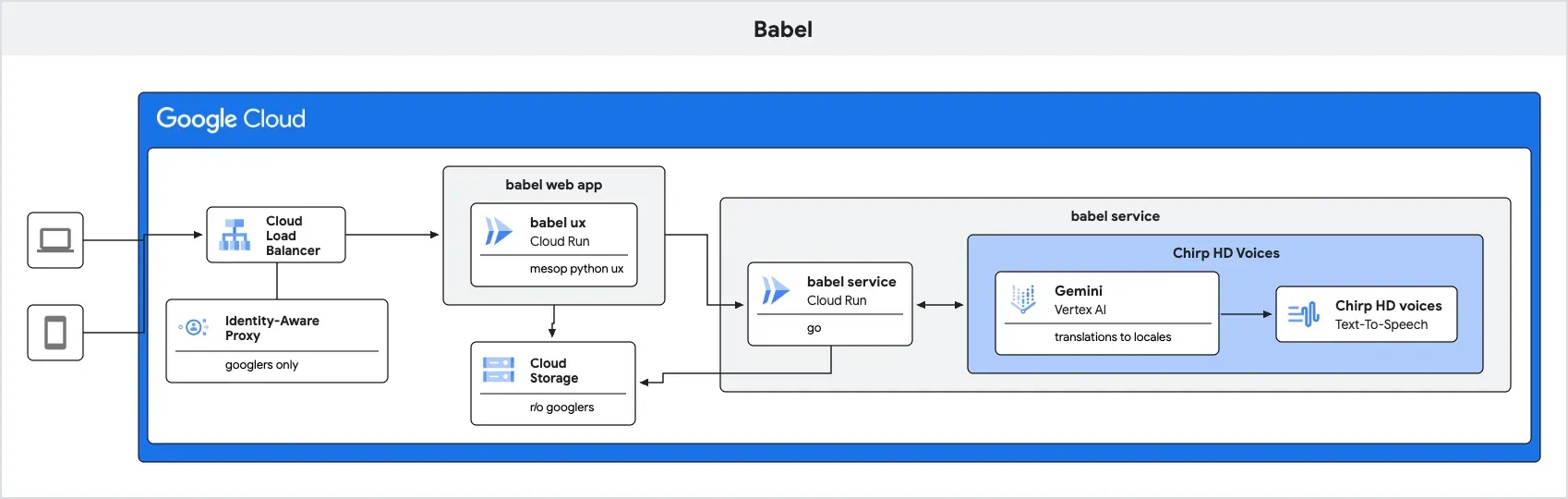
Given a sentence or paragraph, Babel generates audio in all Chirp 3: HD voices and locales, including translation to the proper locale.
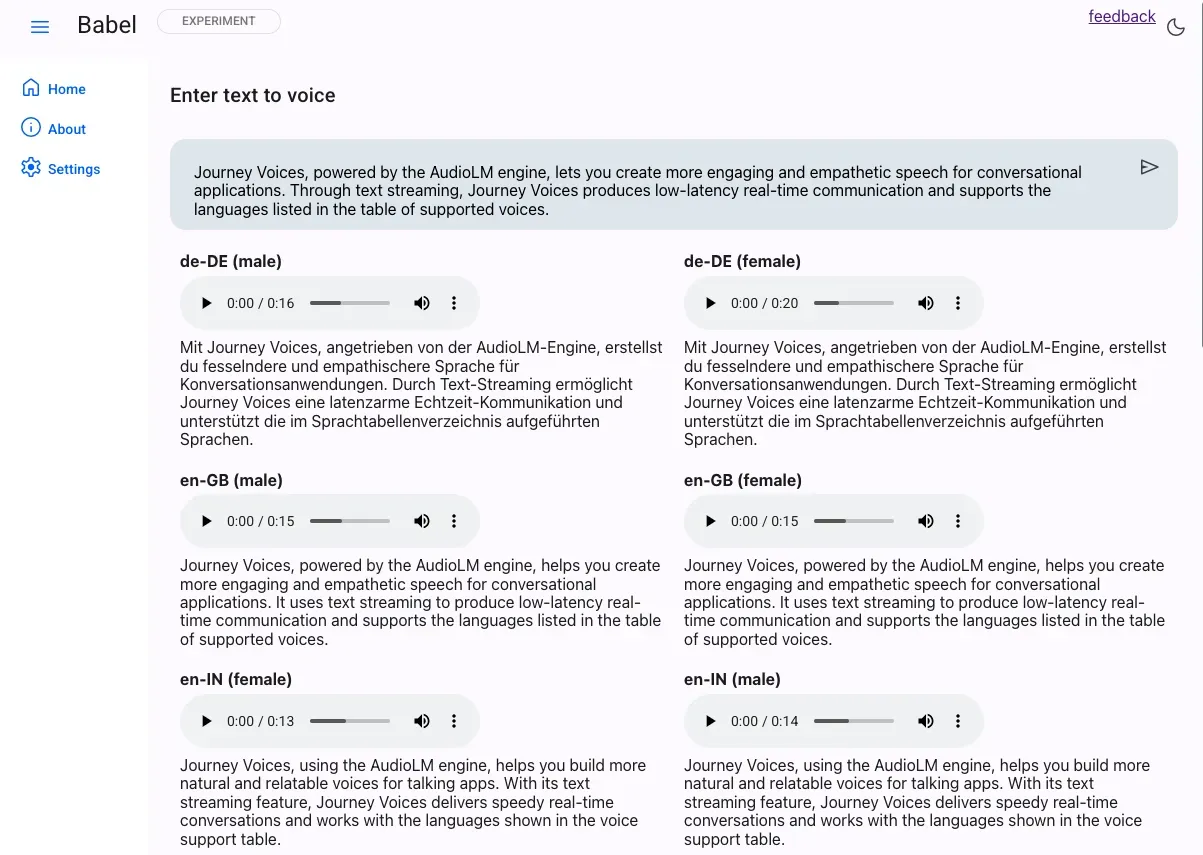
Babel has a command-line, a service endpoint, and a Mesop UX webapp that uses the service.
This is a stand-alone implementation which will be incorporated into GenMedia Studio’s Fabulae component in the future.
Command-line
Section titled “Command-line”You can use babel via the command-line (once built, see below):
> export PROJECT_ID=$(gcloud config get project)
> babel "how are you doing there?"
2024/10/19 09:51:05 17 Journey voices2024/10/19 09:51:05 original statement: how are you doing there?- translating statement ...  [1s]\ generating audio ...  [1s]2024/10/19 09:51:08 complete. wrote 17 files
Build the command-line app
Section titled “Build the command-line app”Use Go to build the command-line app.
go buildThis will output a babel binary for use.
Service - as a web service
Section titled “Service - as a web service”You can use babel as a web service for your front-end apps.
The service consists of 2 endpoints
/babel- return audio for each Chirp 3: HD voice locale, given the statement/voices- return a list of all available Chirp HD voice locales
To run this locally, provide a PROJECT_ID a GCS bucket for the generated voices BABEL_BUCKET and, optionally, the path within that bucket BABEL_PATH (will default to babel).
export PROJECT_ID=$(gcloud config get project)export BABEL_BUCKET=$PROJECT_ID-fabulaeexport BABEL_PATH=babel
babel --service=true
2024/10/19 09:52:56 17 Journey voices2024/10/19 09:52:56 using gs://ghchinoy-genai-sa-fabulae/babel
In another terminal:
curl localhost:8080/babel -d '{"statement":"hi there can you tell me your name"}' -sS | jq .
{    "audio_metadata": [        {            "voice_name": "en-US-Journey-D",            "language_code": "en-US",            "text": "Hey, what's your name? \n",            "audio_path": "20241019.051035.24-en-US-Journey-D-en-US-MALE.wav"        },        {            "voice_name": "fr-CA-Journey-D",            "language_code": "fr-CA",            "text": "Salut, t'es qui toi? \n",            "audio_path": "20241019.051035.24-fr-CA-Journey-D-fr-CA-MALE.wav"        },        {            "voice_name": "en-IN-Journey-F",            "language_code": "en-IN",            "text": "Abey, tera naam kya hai? \n",            "audio_path": "20241019.051035.24-en-IN-Journey-F-en-IN-FEMALE.wav"        }    ...
Deploy to Cloud Run
Section titled “Deploy to Cloud Run”To deploy the service to Cloud Run, you’ll need a few environment variables set
PROJECT_ID- a Google Cloud Project ID, which you can set like so:export PROJECT_ID=$(gcloud config get project)BABEL_BUCKET- a Google Cloud Storage bucket path, to store generated audio files, without thegs://prefix; something likeexport BABEL_BUCKET=${PROJECT_ID}-fabulae/babelSERVICE- this flag indicates you want to run Babel as a service, and not the command, line;export SERVICE=trueSA_ID- a service account, see below to create the service account.
gcloud run deploy babel-fabulae --source . --no-allow-unauthenticated \ --set-env-vars=PROJECT_ID=$(gcloud config get project) \ --set-env-vars=BABEL_BUCKET=${BABEL_BUCKET} \ --set-env-vars=SERVICE=true \ --service-account $SA_IDOnce deployed, the service URL will be returned
Test with an identity token
export SERVICE_URL=https://babel-fabulae-1234.us-central1.run.appexport TOKEN=$(gcloud auth print-identity-token)
curl -d '{"statement": "how are you doing today? its a lovely saturday and Im just trying out a bunch of newly released speech voices"}' -H "Authorization: Bearer ${TOKEN}" ${SERVICE_URL}/babel
Create a service account
Section titled “Create a service account”export PROJECT_ID=$(gcloud info --format='value(config.project)')
export DESC="audio stories"export SA_NAME="sa-fabulae"export SA_ID=${SA_NAME}@${PROJECT_ID}.iam.gserviceaccount.com
# create a service accountgcloud iam service-accounts create $SA_NAME --description $DESC --display-name $SA_NAME
# assign vertex and cloud run rolesgcloud projects add-iam-policy-binding $PROJECT_ID --member="serviceAccount:${SA_ID}" --role "roles/aiplatform.user"gcloud projects add-iam-policy-binding $PROJECT_ID --member="serviceAccount:${SA_ID}" --role "roles/run.invoker"gcloud projects add-iam-policy-binding $PROJECT_ID --member="serviceAccount:${SA_ID}" --role "roles/storage.objectCreator"gcloud projects add-iam-policy-binding $PROJECT_ID --member="serviceAccount:${SA_ID}" --role "roles/storage.objectViewer"Web app
Section titled “Web app”Babel also has a front-end web app, written in Mesop, a Python UX.
The web app is in the app folder.
Here we use uv as the Python package manager, but you can also use whatever you’d like.
cd app# establish a virtual environment for python# uv venv venv && . venv/bin/activate && uv pip install -r requirements.txt
# note no gs:// and trailing /export BABEL_BUCKET=ghchinoy-genai-sa-fabulae/babel/# endpoint (can be Cloud Run, defaults to http://localhost:8080)export SYNTHESIS_ENDPOINT=http://localhost:8080
# start mesop server# we're not using the traditional `mesop main.py` since we're using FastAPIDEBUG_MODE=true uv run main.py
Please note, for local deployment, start the babel service first and specify the BABEL_ENDPOINT environment variable.
Create a service account
Section titled “Create a service account”export PROJECT_ID=$(gcloud info --format='value(config.project)')
export DESC="audio stories"export SA_NAME="sa-fabulae"export SA_ID=${SA_NAME}@${PROJECT_ID}.iam.gserviceaccount.com
# create a service accountgcloud iam service-accounts create $SA_NAME --description $DESC --display-name $SA_NAME
# assign vertex and cloud run rolesgcloud projects add-iam-policy-binding $PROJECT_ID --member="serviceAccount:${SA_ID}" --role "roles/aiplatform.user"gcloud projects add-iam-policy-binding $PROJECT_ID --member="serviceAccount:${SA_ID}" --role "roles/run.invoker"gcloud projects add-iam-policy-binding $PROJECT_ID --member="serviceAccount:${SA_ID}" --role "roles/storage.objectCreator"gcloud projects add-iam-policy-binding $PROJECT_ID --member="serviceAccount:${SA_ID}" --role "roles/storage.objectViewer"Deploy
Section titled “Deploy”Deploy to Cloud Run from source, with a service account, and the BABEL_ENDPOINT, PROJECT_ID, and GENMEDIA_BUCKET environment variables.
Please note that the deployment command below is an open endpoint. Protect this with IAP+Load Balancer or another method of auth, of your choosing.
# SA_ID service account from above# PROJECT_IDexport PROJECT_ID=$(gcloud config get project)# GENMEDIA_BUCKET without the gs:// but with / if it's a folderexport GENMEDIA_BUCKET=${PROJECT_ID}-fabulae/babel/# BABEL_ENDPOINT, change this to your Babel service endpointexport BABEL_ENDPOINT=https://babel-fabulae-1234.us-central1.run.app # change this
gcloud run deploy babel-ux --source . \  --allow-unauthenticated \  --region us-central1 \  --service-account $SA_ID \  --update-env-vars=SYNTHESIS_ENDPOINT=${BABEL_ENDPOINT} \  --update-env-vars=PROJECT_ID=${PROJECT_ID} \  --update-env-vars=GENMEDIA_BUCKET=${GENMEDIA_BUCKET}
You may also use an .env file to specify these. If you do, the .env file values will override any Cloud Run environment variables.
Example .env file (see also blank envfile.example)
#BABEL_ENDPOINT=http://localhost:8080BABEL_ENDPOINT=https://YOUR_CLOUD_RUN_ENDPOINTPROJECT_ID=YOUR_PROJECT_IDLOCATION=us-central1GENMEDIA_BUCKET=YOUR_BUCKET_WITH_PATH