Dual-Graph System of Action: Autonomous Refund Agent Lab Guide
In this hands-on lab, you explore and verify a Dual-Graph System of Action on Google Cloud using Google Agent Development Kit 2.0 (ADK 2.0), Cloud Spanner Graph, BigQuery Graph, Cloud Spanner Data Boost, and Knowledge Catalog.
Lab overview and objectives
Traditional AI customer-support chatbots struggle to execute enterprise actions safely because they lack two structural guarantees:
- Deterministic pre-action operational context: Evaluating whether an order qualifies for an autonomous refund requires traversing live relational order history alongside multi-tier policy rules before mutating transactional state.
- Immutable post-action lineage: Auditing why an autonomous agent approved or blocked a transaction requires a tamper-evident analytical graph recording every workflow node, catalog contract, policy evaluation, and database action.
During this lab, you complete five hands-on activities across the lab web interfaces and the Google Cloud Console (Cloud Spanner Studio, BigQuery Studio, and Knowledge Catalog):
- Google Cloud Console Verification (Proving Real Database State): Inspect
the live
OperationalContextGraphproperty graph in Cloud Spanner Studio, theActionLineageGraphproperty graph in BigQuery Studio, and the governed metric contracts in Knowledge Catalog to confirm that the application reads and writes live Google Cloud databases. - Activity 1 (Standard Tier Approval and 2-Turn Confirmation): Submit an
eligible refund request as Customer A (
user_id: 1001,STANDARDtier) for orderORD-90124(or ask in natural language,"Can I refund my last order?"), observe how the agent pauses atPENDING_CONFIRMATIONbefore mutating Cloud Spanner, confirm the order and item details to commit theAPPROVEDmutation, and inspect the trace in UI 2 (/console) and Cloud Spanner Studio. - Activity 2 (Standard Tier Policy Denial): Submit a refund request as
Customer B (
user_id: 2048,STANDARDtier) for orderORD-90588(12 >= 10returns in the last 100 days) and verify how the deterministic policy gate blocks the Cloud Spanner mutation (BLOCK_SPANNER_MUTATION). - Activity 3 (VIP Tier Policy Resolution via Knowledge Catalog): Submit a
refund request as Customer C (
user_id: 3072,VIPtier) for orderORD-90910(12 < 20returns in the last 100 days) and verify how the workflow resolvescustomer-loyalty-tier(VIP) from Knowledge Catalog and matchesCOND-REFUND-VIP-100D-30D(max_refunds_100d = 20). - Activity 4 (Cross-Engine Federated Audit): Execute a BigQuery
EXTERNAL_QUERYover the Cloud Spanner Data Boost connection (spanner-data-boost) in UI 2 (/console) and BigQuery Studio, joining live Cloud Spanner operational graph state with BigQuerysoa_action_lineagerecords.
How the Dual-Graph System of Action works behind the UI
Google Cloud components and responsibilities
The following table summarizes which Google Cloud component, property graph, and policy artifact executes at each layer of the architecture:
| Layer | Google Cloud component | Resource or graph name | Role in the System of Action |
|---|---|---|---|
| Agent orchestration | Google ADK 2.0 on Cloud Run + Vertex AI (gemini-3-flash-preview) |
soa-refund-agent-app (RefundSystemOfActionWorkflow) |
Executes the 5-step deterministic + LLM workflow (IntentAgent and ResponseAgent configured with ADK_MODEL_NAME = "gemini-3-flash-preview", ThinkingLevel.MINIMAL, a 4-second single-attempt timeout, single-LLM-call quota optimization on explicit ORD-<id> prompt chips, and deterministic fallbacks), streams live [1/5]..[5/5] step telemetry (POST /api/chat/refund/stream), resolves multi-turn order references and unpurchased products (unmatched_product), and enforces the 2-turn customer confirmation gate. |
| Semantic governance | Knowledge Catalog (Business Glossary and Aspect Types) | soa-business-glossary, refund-metric-contract |
Governs canonical business terms (rolling-100d-refund-count, order-age-days, customer-loyalty-tier) and attaches machine-readable threshold contracts (STANDARD = 10, VIP = 20, return_window_days = 30). |
| Operational context graph (Graph 1) | Cloud Spanner Enterprise (Spanner Graph) | Instance: soa-graph-instance, Database: thelook-soa-db, Graph: OperationalContextGraph |
Combines Relational-to-Graph (R2G) e-commerce tables (users, orders, order_items, inventory_items, products, distribution_centers) with Unstructured-to-Graph (U2G) policy tables (policies, policy_conditions, policy_restrictions) in ISO GQL. |
| Action lineage graph (Graph 2) | BigQuery (BigQuery Graph) | Dataset: soa_action_lineage, Graph: ActionLineageGraph |
Stores append-only audit records (agent_sessions, workflow_nodes, policy_evaluations, agent_actions) modeling every workflow execution and policy decision. |
| Cross-engine federation | BigQuery Cloud Spanner external connection + Spanner Data Boost | Connection: spanner-data-boost (use_data_boost = true, use_parallelism = true) |
Pushes read-only ISO GQL queries from BigQuery EXTERNAL_QUERY to isolated Spanner Data Boost compute without impacting transactional Cloud Spanner CPU. |
Dual-Graph architecture and 5-step ADK 2.0 workflow
The diagram below illustrates how UI 1 (/shop) and UI 2 (/console)
interact with the 5-step ADK 2.0 workflow, Knowledge Catalog,
Cloud Spanner OperationalContextGraph, and BigQuery
ActionLineageGraph:

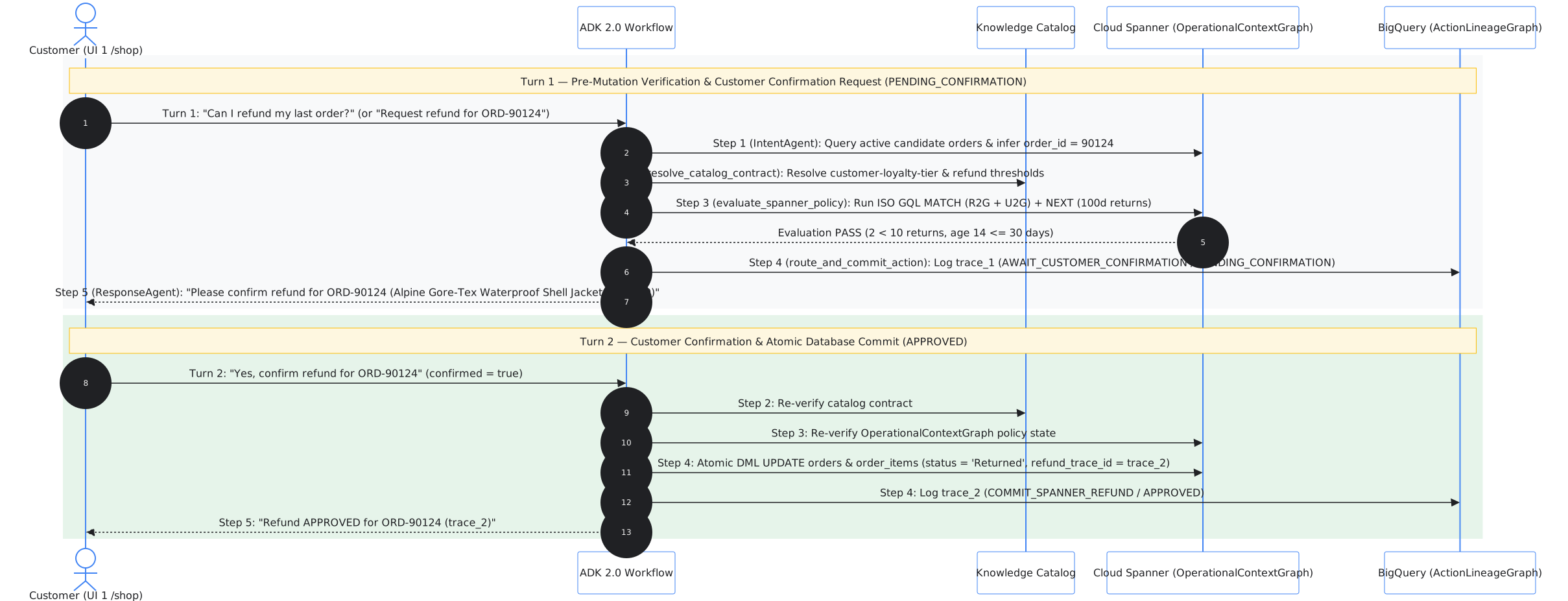
Two-turn confirmation sequence (PENDING_CONFIRMATION to APPROVED or DENIED)
Whenever a valid customer order is resolved (order_id is not None and
order_found == True), the agent pauses for a two-turn verification protocol so
the customer confirms the resolved order ID, product photo, item name, and price
before committing the Cloud Spanner transaction or issuing the final refund
verdict:
Property graph node and edge schemas
Both graphs share a durable cross-graph reconciliation identifier
(order_items.refund_trace_id in Cloud Spanner and agent_sessions.trace_id in
BigQuery):

Reference summary of demo personas, orders, and policies
| Persona | user_id |
Loyalty tier | Order ID | Order status & delivery age | 100-day prior returns | Matched policy condition | Expected workflow outcome |
|---|---|---|---|---|---|---|---|
| Customer A (Alice Chen) | 1001 |
STANDARD |
ORD-90124 |
Complete (14 days ago) |
2 items |
COND-REFUND-STD-100D-30D (max_refunds_100d = 10, window = 30d) |
Turn 1: PENDING_CONFIRMATION, Turn 2: APPROVED (COMMIT_SPANNER_REFUND) |
| Customer A (Alice Chen) | 1001 |
STANDARD |
ORD-90125 |
Complete (45 days ago) |
2 items |
COND-REFUND-STD-100D-30D (window = 30d) |
Turn 1: PENDING_CONFIRMATION, Turn 2: DENIED (RETURN_WINDOW_EXPIRED) |
| Customer A (Alice Chen) | 1001 |
STANDARD |
ORD-90126 |
Shipped (in transit) |
2 items |
COND-REFUND-STD-100D-30D (requires Complete) |
Turn 1: PENDING_CONFIRMATION, Turn 2: DENIED (ORDER_NOT_DELIVERED) |
| Customer B (Jordan Taylor) | 2048 |
STANDARD |
ORD-90588 |
Complete (10 days ago) |
12 items |
COND-REFUND-STD-100D-30D (max_refunds_100d = 10) |
Turn 1: PENDING_CONFIRMATION, Turn 2: DENIED (MAX_REFUNDS_EXCEEDED, BLOCK_SPANNER_MUTATION) |
| Customer C (Claire Vance) | 3072 |
VIP |
ORD-90910 |
Complete (7 days ago) |
12 items |
COND-REFUND-VIP-100D-30D (max_refunds_100d = 20, window = 30d) |
Turn 1: PENDING_CONFIRMATION, Turn 2: APPROVED (COMMIT_SPANNER_REFUND) |
Step 1: Open the lab web interfaces and Google Cloud Console
- Locate the Terraform outputs in your Qwiklabs environment panel:
shopping_mall_url: Opens UI 1 (TheLook Shopping Mall and Chat App,/shop).data_engineer_console_url: Opens UI 2 (Data Engineer Investigation Console,/console).gcp_project_id: Your Google Cloud project ID.
- Open both
shopping_mall_urlanddata_engineer_console_urlin separate browser tabs. - Open the Google Cloud Console (
https://console.cloud.google.com) in a third browser tab using your Qwiklabs student credentials and ensure your lab project (gcp_project_id) is selected.
Step 2: Inspect the underlying databases in the Google Cloud Console
Before triggering any agent actions in the web UI, inspect the underlying databases and catalog resources directly in the Google Cloud Console to see how the graph schemas, relational tables, and governance contracts are stored.
2a. Inspect governed business terms in Knowledge Catalog
- In the Google Cloud Console search bar, search for Knowledge Catalog and open the service, then select Glossaries in the left navigation menu.
- Click System of Action Business Glossary (
soa-business-glossaryin locationus). - Observe the category Refund Policy Metrics (
refund-policy-metrics) and click each of the three governed business glossary terms:100-Day Rolling Refund Count(rolling-100d-refund-count): Defines how Step 3 counts returnedorder_items(status = 'Returned') over the trailing 100 days excluding the target order.Order Delivery Age in Days(order-age-days): Defines the 30-day post-delivery eligibility window (status = 'Complete'andage <= 30).Customer Loyalty Tier(customer-loyalty-tier): Defines the tier routing contract (STANDARDvs.VIP).
- In the left navigation menu of Knowledge Catalog, click Aspect Types
(or view the Aspects tab on any of the three glossary terms) to inspect
the custom
Refund Policy Metric Contract(refund-metric-contract) aspect attached to each glossary entry (standard_max_refunds_100d = 10,vip_max_refunds_100d = 20,return_window_days = 30). During Step 2 of the ADK workflow (resolve_catalog_contract), the agent queries these live Knowledge Catalog entries via the Catalog API.
2b. Query OperationalContextGraph in Cloud Spanner Studio
- In the Google Cloud Console navigation menu, go to Spanner > Instances.
- Click System of Action Graph Instance (
soa-graph-instance), then click the databasethelook-soa-db. - In the left navigation menu of
thelook-soa-db, click Spanner Studio and review the database objects in the Explorer sidebar:- Tables: Inspect the 6 Relational-to-Graph (R2G) tables (
users,orders,order_items,inventory_items,products,distribution_centers) and the 3 Unstructured-to-Graph (U2G) policy tables (policies,policy_conditions,policy_restrictions). - Graphs: Expand the
Graphstree item in the sidebar to findOperationalContextGraph. Click the three-dots (View actions) menu next toOperationalContextGraphand selectView/modify visuallyto inspect the visualized graph schema mapping the node tables (users,orders,inventory_items,products,distribution_centers,policies,policy_conditions,policy_restrictions) and edge tables (places,contains_item,is_product,supplied_by,governed_by,requires_condition,enforces_restriction).
- Tables: Inspect the 6 Relational-to-Graph (R2G) tables (
-
In Spanner Studio, open a new SQL/GQL editor tab and run the following native ISO GQL query to visualize the live property graph data in the Google Cloud Console:
-- Purpose: Visualize the live R2G + U2G property graph topology in Spanner Studio. -- Target Engine: Cloud Spanner (thelook-soa-db -> OperationalContextGraph). -- How It Works: Traverses from users -> orders -> inventory_items -> products -- -> distribution_centers and links products to active policies, tier-matched -- policy_conditions, and policy_restrictions, returning JSON graph elements. -- Information Gathered: Full node/edge JSON objects to render the interactive -- property graph in Cloud Spanner Studio (Graph and Table views). GRAPH OperationalContextGraph MATCH (u:users)-[e_places:places]->(o:orders {order_id: 90124}) -[e_item:contains_item]->(ii:inventory_items) -[e_prod:is_product]->(p:products) -[e_dc:supplied_by]->(dc:distribution_centers), (p)-[e_gov:governed_by]->(pol:policies {status: 'ACTIVE'}) -[e_cond:requires_condition]->(cond:policy_conditions), (pol)-[e_res:enforces_restriction]->(res:policy_restrictions) WHERE cond.applicable_tier = u.customer_tier RETURN TO_JSON(u) AS user_node, TO_JSON(e_places) AS places_edge, TO_JSON(o) AS order_node, TO_JSON(e_item) AS contains_item_edge, TO_JSON(ii) AS inventory_node, TO_JSON(p) AS product_node, TO_JSON(dc) AS dc_node, TO_JSON(pol) AS policy_node, TO_JSON(cond) AS condition_node, TO_JSON(res) AS restriction_node; -
In the Spanner Studio results pane, toggle between the Graph view (where you can click and drag the Cloud Spanner nodes and edges) and the Table view. Notice that
o.statusis currently'Complete'ande_item.refund_trace_idisNULL.
2c. Inspect ActionLineageGraph in BigQuery Studio
- In the Google Cloud Console navigation menu, go to BigQuery > Studio.
- In the Explorer pane, expand your project and expand the dataset
soa_action_lineage. - Observe the four lineage tables (
agent_sessions,workflow_nodes,policy_evaluations,agent_actions) and the property graphActionLineageGraph, as well as the external connectionus-central1.spanner-data-boostunder External connections.
Step 3: Activity 1: Customer A eligible refund and 2-turn confirmation (STANDARD tier)
In this activity, you act as Customer A (Alice Chen, user_id: 1001,
STANDARD tier) in UI 1 (/shop) to test both contextual order inference
and the 2-turn pre-execution confirmation gate, then verify the live database
changes in Cloud Spanner Studio, BigQuery Studio, and UI 2
(/console).
3a. Trigger Turn 1 (PENDING_CONFIRMATION) in UI 1
- In UI 1 (
/shop), ensure Alice Chen (user_id: 1001,STANDARDtier) is selected in the Active Customer Persona Switcher. - Review Alice Chen's orders in the main panel:
ORD-90124: Alpine Gore-Tex Waterproof Shell Jacket ($129.00), statusComplete, delivered 14 days ago.ORD-90125: Polarized Aviator Titanium Sunglasses ($165.00), statusComplete, delivered 45 days ago.ORD-90126: Cashmere Ribbed Winter Beanie ($58.00), statusShipped(in transit).
-
In the ADK 2.0 Refund Agent chat widget on the right, either click the Request refund for ORD-90124 (Eligible Standard) prompt chip or type a natural-language request without an order number:
-
Observe what happens behind the UI during Turn 1 as the chat widget streams live
[1/5]..[5/5]per-node execution progress (POST /api/chat/refund/stream) and automatically restores keyboard focus to the chat input:- Step 1 (
IntentAgent): Queries Alice's active non-returned orders in Cloud Spanner. When an explicitORD-90124order ID is present (such as clicking the prompt chip), Step 1 resolvesorder_id = 90124directly and saves Vertex AI quota for Step 5. When a natural-language request like"Can I refund my last order?"is typed, Step 1 invokesgemini-3-flash-preview(ThinkingLevel.MINIMAL, 4-second timeout with deterministic fallback) to inferorder_id = 90124(resolution_mode = 'inferred'), the most recently deliveredCompleteorder. - Step 2 (
resolve_catalog_contract): Fetchesrolling-100d-refund-countfrom Knowledge Catalog (max_refunds_100d = 10,return_window_days = 30). - Step 3 (
evaluate_spanner_policy): Executes the ISO GQL query onOperationalContextGraph, matchingCOND-REFUND-STD-100D-30Dand confirmingprior_refund_count_100d = 2 < 10andtarget_order_age_days = 14 <= 30(evaluation_result = 'PASS'). - Step 4 (
route_and_commit_action): Pauses before mutating Cloud Spanner because the customer has not yet confirmed the order and item details, logs aPENDING_CONFIRMATIONtrace (action_type = 'AWAIT_CUSTOMER_CONFIRMATION') to BigQuery, and returns a confirmation prompt (synthesized byResponseAgentviagemini-3-flash-previewin Step 5) with a Yes, confirm refund for ORD-90124 button.
- Step 1 (
3b. Verify in Cloud Spanner Studio that the order is not yet mutated
-
Switch to your Cloud Spanner Studio browser tab (
thelook-soa-db) and run:-- Purpose: Verify the live transactional state of Order 90124 before and after -- customer confirmation (Turn 1 PENDING_CONFIRMATION vs. Turn 2 APPROVED). -- Target Engine: Cloud Spanner (thelook-soa-db relational tables: orders, order_items). -- How It Works: Joins orders and order_items on (user_id, order_id) for order_id = 90124. -- Information Gathered: Current order_status ('Complete' before confirmation, -- 'Returned' after commit), returned_at timestamp, item_status, and the -- cross-graph reconciliation key (refund_trace_id). SELECT o.order_id, o.status AS order_status, o.returned_at, oi.status AS item_status, oi.refund_trace_id FROM orders AS o JOIN order_items AS oi ON o.user_id = oi.user_id AND o.order_id = oi.order_id WHERE o.order_id = 90124; -
Verify that
order_statusis still'Complete'andrefund_trace_idisNULL, confirming that Turn 1 (PENDING_CONFIRMATION) evaluated the operational graph without modifying transactional state.
3c. Confirm the refund (Turn 2 APPROVED) and verify the mutation
- Return to UI 1 (
/shop) and click Yes, confirm refund for ORD-90124 (or typeYes, please proceed). - Observe that Turn 2 re-verifies the policy in
OperationalContextGraph, executes the atomic Cloud Spanner DML transaction updatingORD-90124toReturned, writes the newtrace_idtoorder_items.refund_trace_id, and displays theAPPROVEDbadge in the chat widget. - Switch back to Cloud Spanner Studio and re-run the same SQL query from
Step 3b. Confirm that
order_statusanditem_statusare now'Returned',returned_atis populated with the commit timestamp, andrefund_trace_idcontains the exact UUIDtrace_iddisplayed in the chat widget.
3d. Inspect the operational context and lineage graphs in UI 2 and BigQuery Studio
- In UI 1 (
/shop), click Inspect in Data Engineer Console on theAPPROVEDchat card to open UI 2 (/console) pre-filtered to Customer A'strace_id. - In UI 2 (
/console), click the nodes in the Interactive Dual-Graph Visualizer (User 1001,Order 90124,Product,Policy POL-REFUND-STD-V1,Condition COND-REFUND-STD-100D-30D, and the orange BigQuery lineage nodes) to inspect their live properties in the Node Property Inspector. -
In Tab 1 (1. Cloud Spanner Context Graph), click Run Query (or run the same query directly in Cloud Spanner Studio):
-- Purpose: Evaluate Customer A's operational context and tiered refund policy -- eligibility in a single two-stage ISO GQL traversal. -- Target Engine: Cloud Spanner (thelook-soa-db -> OperationalContextGraph). -- How It Works: -- Stage 1 (MATCH): Traverses R2G (users -> orders -> inventory_items -> -- products -> distribution_centers) and U2G (products -> policies -> -- policy_conditions / policy_restrictions) filtered by customer_tier. -- Stage 2 (NEXT + OPTIONAL MATCH): Counts distinct returned items across -- other orders within the 100-day rolling window. -- Information Gathered: Customer tier, target order status/age/price, product -- and fulfillment center names, active policy/condition IDs, 100-day return -- cap (max_refunds_100d), 30-day window, and observed prior_refund_count_100d. GRAPH OperationalContextGraph MATCH (u:users {id: 1001}) -[:places]->(target_o:orders {order_id: 90124}) -[target_oi:contains_item]->(ii:inventory_items)-[:is_product]->(p:products) -[:supplied_by]->(dc:distribution_centers), (p)-[:governed_by]->(pol:policies {status: 'ACTIVE'}) -[:requires_condition]->(cond:policy_conditions), (pol)-[:enforces_restriction]->(res:policy_restrictions) WHERE u.customer_tier IN ('STANDARD', 'VIP') AND cond.applicable_tier = u.customer_tier RETURN u.id AS user_id, u.email AS email, u.customer_tier AS customer_tier, target_o.order_id AS target_order_id, target_o.status AS target_order_status, TIMESTAMP_DIFF(CURRENT_TIMESTAMP(), target_o.delivered_at, DAY) AS target_order_age_days, ROUND(SUM(target_oi.sale_price), 2) AS target_order_price, STRING_AGG(DISTINCT p.name, ', ') AS product_names, STRING_AGG(DISTINCT dc.name, ', ') AS distribution_center_names, pol.policy_id AS policy_id, pol.name AS policy_name, cond.condition_id AS condition_id, cond.max_refunds_100d AS max_refunds_100d, cond.return_window_days AS return_window_days, res.action_code AS restriction_action GROUP BY user_id, email, customer_tier, target_order_id, target_order_status, target_order_age_days, policy_id, policy_name, condition_id, max_refunds_100d, return_window_days, restriction_action NEXT -- Stage 2: Count prior returned items in the rolling 100-day window OPTIONAL MATCH (u2:users)-[:places]->(hist_o:orders)-[hist_oi:contains_item]->(:inventory_items) WHERE u2.id = user_id AND hist_o.order_id != target_order_id AND hist_oi.status = 'Returned' AND COALESCE(hist_oi.returned_at, hist_o.returned_at, hist_o.created_at) >= TIMESTAMP_SUB(CURRENT_TIMESTAMP(), INTERVAL 100 DAY) RETURN user_id, email, customer_tier, target_order_id, target_order_status, product_names, distribution_center_names, target_order_price, target_order_age_days, COUNT(DISTINCT hist_oi.id) AS prior_refund_count_100d, policy_id, policy_name, condition_id, max_refunds_100d, return_window_days, restriction_action GROUP BY user_id, email, customer_tier, target_order_id, target_order_status, product_names, distribution_center_names, target_order_price, target_order_age_days, policy_id, policy_name, condition_id, max_refunds_100d, return_window_days, restriction_action; -
Switch to Tab 2 (2. BigQuery Action Lineage Graph) in UI 2 (
/console) and click Run Query, or open BigQuery Studio and run the following query to inspect both thePENDING_CONFIRMATION(Turn 1) andAPPROVED(Turn 2) lineage traces recorded fortarget_order_id = 90124:-- Purpose: Audit the append-only agent decision lineage for Customer A's -- Order 90124 across Turn 1 (PENDING_CONFIRMATION) and Turn 2 (APPROVED). -- Target Engine: BigQuery (soa_action_lineage dataset backing ActionLineageGraph). -- How It Works: Joins agent_sessions -> workflow_nodes -> policy_evaluations -- -> agent_actions along the ActionLineageGraph primary/foreign keys. -- Information Gathered: Session trace_id, Knowledge Catalog term (catalog_term_id), -- evaluated policy name, observed vs. maximum 100-day refunds, PASS/FAIL -- result, executed action_type, decision_status, and commit timestamp. SELECT s.trace_id, s.customer_id, s.target_order_id, n.node_name, pe.catalog_term_id, pe.policy_name, pe.observed_refunds_100d AS prior_refund_count_100d, pe.max_refunds_100d, pe.evaluation_result, act.action_type, act.decision_status, act.created_at AS committed_at FROM `soa_action_lineage.agent_sessions` AS s JOIN `soa_action_lineage.workflow_nodes` AS n ON s.trace_id = n.trace_id AND n.node_name = 'evaluate_spanner_policy' JOIN `soa_action_lineage.policy_evaluations` AS pe ON n.node_exec_id = pe.node_exec_id JOIN `soa_action_lineage.agent_actions` AS act ON pe.eval_id = act.eval_id WHERE s.customer_id = 1001 AND s.target_order_id = 90124 ORDER BY s.started_at DESC;
Note
If your Google Cloud project has a BigQuery Enterprise reservation attached,
you can also run the ISO GQL FROM
GRAPH_TABLE(soa_action_lineage.ActionLineageGraph MATCH ...) query shown in
Tab 2 of UI 2 (/console). On standard on-demand billing (gcpfree), UI
2 automatically falls back to the equivalent parameterized SQL JOIN above.
Step 4: Activity 2: Customer B policy denial (STANDARD tier)
In this activity, you test how the deterministic graph policy gate blocks an
autonomous refund when Customer B (Jordan Taylor, user_id: 2048,
STANDARD tier) reaches or exceeds the 100-day return threshold (12 >= 10),
then verify the blocked mutation and rejection lineage in Cloud Spanner
Studio, BigQuery Studio, and UI 2 (/console).
4a. Trigger Turn 1 (PENDING_CONFIRMATION) and Turn 2 (DENIED) in UI 1
- Return to UI 1 (
/shop) and select Jordan Taylor (user_id: 2048,STANDARDtier) in the Active Customer Persona Switcher. - Review Jordan Taylor's order and return profile in the main panel:
100-Day Returned Items:12 / 10(ORD-81001throughORD-81012returned within the trailing 100-day window).ORD-90588: CloudStride Trail Running Shoes ($148.00), statusComplete, delivered 10 days ago.
-
In the ADK 2.0 Refund Agent chat widget on the right, either click the Request refund for ORD-90588 (Standard 12 >= 10 Limit) prompt chip or type:
-
Observe Turn 1 (
PENDING_CONFIRMATION), then click Yes, confirm refund for ORD-90588 to execute Turn 2 (DENIED). Observe what happens behind the UI across both turns:- Step 1 (
IntentAgent): Resolvesorder_id = 90588(CloudStride Trail Running Shoes,$148.00) foruser_id = 2048. - Step 2 (
resolve_catalog_contract): Resolves the governedrolling-100d-refund-countcontract (max_refunds_100d = 10,return_window_days = 30) from Knowledge Catalog. - Step 3 (
evaluate_spanner_policy): TraversesOperationalContextGraphin Cloud Spanner (u.customer_tier = 'STANDARD', matchingCOND-REFUND-STD-100D-30Dwithmax_refunds_100d = 10) and countsprior_refund_count_100d = 12in theNEXTstage. Because12 >= 10, Step 3 returnsevaluation_result = 'FAIL'andfailure_code = 'MAX_REFUNDS_EXCEEDED'. - Step 4 (
route_and_commit_action): On Turn 1, the workflow pauses atPENDING_CONFIRMATION(action_type = 'AWAIT_CUSTOMER_CONFIRMATION') so the customer confirms the target order first. On Turn 2, the deterministic policy gate blocks the refund (decision_status = 'DENIED',action_type = 'BLOCK_SPANNER_MUTATION') without modifyingORD-90588in Cloud Spanner.
- Step 1 (
4b. Verify in Cloud Spanner Studio that the denied order was not mutated
-
Switch to your Cloud Spanner Studio browser tab (
thelook-soa-db) and run:-- Purpose: Verify that Order 90588 remains untouched in Cloud Spanner after -- Turn 2 policy denial (BLOCK_SPANNER_MUTATION). -- Target Engine: Cloud Spanner (thelook-soa-db relational tables: orders, order_items). -- How It Works: Joins orders and order_items on (user_id, order_id) for order_id = 90588. -- Information Gathered: Confirms order_status and item_status remain 'Complete', -- returned_at is NULL, and refund_trace_id is NULL. SELECT o.order_id, o.status AS order_status, o.returned_at, oi.status AS item_status, oi.refund_trace_id FROM orders AS o JOIN order_items AS oi ON o.user_id = oi.user_id AND o.order_id = oi.order_id WHERE o.order_id = 90588; -
Verify that
order_statusanditem_statusare still'Complete',returned_atisNULL, andrefund_trace_idisNULL, confirming thatBLOCK_SPANNER_MUTATIONprevented any database write when policy evaluation failed.
4c. Inspect the policy denial in UI 2 and Cloud Spanner Studio
- In UI 1 (
/shop), click Inspect in Data Engineer Console on theDENIEDchat card to open UI 2 (/console) pre-filtered to Customer B'sDENIEDtrace_id. - In UI 2 (
/console), click the nodes in the Interactive Dual-Graph Visualizer (User 2048,Order 90588,Product,Policy POL-REFUND-STD-V1,Condition COND-REFUND-STD-100D-30D,Restriction RES-BLOCK-REFUND, and the BigQueryFAIL/DENIEDlineage nodes) to inspect their live properties in the Node Property Inspector. Scroll to the bottom of UI 2 (/console) to review the Knowledge Catalog Semantic Contract (rolling-100d-refund-count, clicking Preview Glossary & Contract to inspect the governed terms and canonical SQL/GQL mappings) and Policy Document (U2G) & Extracted Triples (clicking Preview return_policy_v1.md to inspect the source Markdown return policy and U2G conversion pipeline) panels. -
In Tab 1 (1. Cloud Spanner Context Graph), click the
Activity 2:
    Customer B (2048 / ORD-90588 Denied)
preset button and click Run Query (or run the same query directly in Cloud Spanner Studio):-- Purpose: Verify why Customer B's Order 90588 triggered a policy denial in -- Cloud Spanner OperationalContextGraph. -- Target Engine: Cloud Spanner (thelook-soa-db -> OperationalContextGraph). -- How It Works: -- Stage 1 (MATCH): Resolves Customer B's STANDARD tier condition -- (COND-REFUND-STD-100D-30D, max_refunds_100d = 10) and restriction action. -- Stage 2 (NEXT + OPTIONAL MATCH): Aggregates prior returned items across -- other orders in the last 100 days (prior_refund_count_100d = 12 >= 10). -- Information Gathered: Confirms target_order_status remains 'Complete' and -- prior_refund_count_100d (12) reaches/exceeds max_refunds_100d (10). GRAPH OperationalContextGraph MATCH (u:users {id: 2048}) -[:places]->(target_o:orders {order_id: 90588}) -[target_oi:contains_item]->(ii:inventory_items)-[:is_product]->(p:products) -[:supplied_by]->(dc:distribution_centers), (p)-[:governed_by]->(pol:policies {status: 'ACTIVE'}) -[:requires_condition]->(cond:policy_conditions), (pol)-[:enforces_restriction]->(res:policy_restrictions) WHERE u.customer_tier IN ('STANDARD', 'VIP') AND cond.applicable_tier = u.customer_tier RETURN u.id AS user_id, u.email AS email, u.customer_tier AS customer_tier, target_o.order_id AS target_order_id, target_o.status AS target_order_status, TIMESTAMP_DIFF(CURRENT_TIMESTAMP(), target_o.delivered_at, DAY) AS target_order_age_days, ROUND(SUM(target_oi.sale_price), 2) AS target_order_price, STRING_AGG(DISTINCT p.name, ', ') AS product_names, STRING_AGG(DISTINCT dc.name, ', ') AS distribution_center_names, pol.policy_id AS policy_id, pol.name AS policy_name, cond.condition_id AS condition_id, cond.max_refunds_100d AS max_refunds_100d, cond.return_window_days AS return_window_days, res.action_code AS restriction_action GROUP BY user_id, email, customer_tier, target_order_id, target_order_status, target_order_age_days, policy_id, policy_name, condition_id, max_refunds_100d, return_window_days, restriction_action NEXT -- Stage 2: Count prior returned items in the rolling 100-day window OPTIONAL MATCH (u2:users)-[:places]->(hist_o:orders)-[hist_oi:contains_item]->(:inventory_items) WHERE u2.id = user_id AND hist_o.order_id != target_order_id AND hist_oi.status = 'Returned' AND COALESCE(hist_oi.returned_at, hist_o.returned_at, hist_o.created_at) >= TIMESTAMP_SUB(CURRENT_TIMESTAMP(), INTERVAL 100 DAY) RETURN user_id, email, customer_tier, target_order_id, target_order_status, product_names, distribution_center_names, target_order_price, target_order_age_days, COUNT(DISTINCT hist_oi.id) AS prior_refund_count_100d, policy_id, policy_name, condition_id, max_refunds_100d, return_window_days, restriction_action GROUP BY user_id, email, customer_tier, target_order_id, target_order_status, product_names, distribution_center_names, target_order_price, target_order_age_days, policy_id, policy_name, condition_id, max_refunds_100d, return_window_days, restriction_action; -
Verify from the query results that although
target_order_status = 'Complete'andtarget_order_age_days = 10(within the 30-day window), Customer B hascustomer_tier = 'STANDARD',condition_id = 'COND-REFUND-STD-100D-30D',prior_refund_count_100d = 12, andmax_refunds_100d = 10, triggeringrestriction_action = 'DENY_AUTONOMOUS_REFUND'.
4d. Inspect the rejection lineage in UI 2 and BigQuery Studio
- Switch to Tab 2 (2. BigQuery Action Lineage Graph) in UI 2
(
/console), click theActivity 2: ActionLineageGraph GQL (Denial)preset button (orStandard SQL JOIN Equivalent (On-Demand Fallback)), and click Run Query. -
To run the same lineage audit directly in BigQuery Studio, execute the following query to inspect both the Turn 1 (
PENDING_CONFIRMATION) and Turn 2 (DENIED) lineage records fortarget_order_id = 90588:-- Purpose: Audit the append-only agent decision lineage for Customer B's -- Order 90588 across Turn 1 (PENDING_CONFIRMATION) and Turn 2 (DENIED). -- Target Engine: BigQuery (soa_action_lineage dataset backing ActionLineageGraph). -- How It Works: Joins agent_sessions -> workflow_nodes -> policy_evaluations -- -> agent_actions along the ActionLineageGraph primary/foreign keys. -- Information Gathered: Session trace_id, Knowledge Catalog term (catalog_term_id), -- observed vs. maximum 100-day refunds (12 vs. 10), evaluation_result ('FAIL'), -- action_type ('BLOCK_SPANNER_MUTATION'), decision_status ('DENIED'), and -- the human-readable rejection_reason. SELECT s.trace_id, s.customer_id, s.target_order_id, n.node_name, pe.catalog_term_id, pe.policy_name, pe.observed_refunds_100d AS prior_refund_count_100d, pe.max_refunds_100d, pe.evaluation_result, act.action_type, act.decision_status, act.rejection_reason, act.created_at AS committed_at FROM `soa_action_lineage.agent_sessions` AS s JOIN `soa_action_lineage.workflow_nodes` AS n ON s.trace_id = n.trace_id AND n.node_name = 'evaluate_spanner_policy' JOIN `soa_action_lineage.policy_evaluations` AS pe ON n.node_exec_id = pe.node_exec_id JOIN `soa_action_lineage.agent_actions` AS act ON pe.eval_id = act.eval_id WHERE s.customer_id = 2048 AND s.target_order_id = 90588 ORDER BY s.started_at DESC; -
Verify that
ActionLineageGraphrecordscatalog_term_id = 'rolling-100d-refund-count',prior_refund_count_100d = 12,max_refunds_100d = 10,evaluation_result = 'FAIL',action_type = 'BLOCK_SPANNER_MUTATION', anddecision_status = 'DENIED'alongside therejection_reason.
Step 5: Activity 3: Customer C VIP tier approval via Knowledge Catalog (VIP tier)
In this activity, you verify how contextual graph routing and Knowledge
Catalog resolve a higher policy threshold (max_refunds_100d = 20)
for Customer C (Claire Vance, user_id: 3072, VIP tier), approving a
refund even though Customer C has the same 100-day return count (12 returns)
that blocked Customer B in Activity 2.
5a. Trigger Turn 1 (PENDING_CONFIRMATION) and Turn 2 (APPROVED) in UI 1
- Return to UI 1 (
/shop) and select Claire Vance (user_id: 3072,VIPtier) in the Active Customer Persona Switcher. - Review Claire Vance's order and return profile in the main panel:
100-Day Returned Items:12 / 20(ORD-82001throughORD-82012returned within the trailing 100-day window, governed by theVIPtier limit of20).ORD-90910: Tailored Italian Wool Travel Blazer ($210.00), statusComplete, delivered 7 days ago.
-
In the ADK 2.0 Refund Agent chat widget on the right, click the Request refund for ORD-90910 (VIP 12 < 20 Limit) prompt chip or type:
-
Observe Turn 1 (
PENDING_CONFIRMATION), then click Yes, confirm refund for ORD-90910 to execute Turn 2 (APPROVED). Observe what happens behind the UI across both turns:- Step 1 (
IntentAgent): Queries Claire Vance's active orders and resolvesorder_id = 90910(Tailored Italian Wool Travel Blazer,$210.00). - Step 2 (
resolve_catalog_contract): Detects thatuser_id = 3072carriescustomer_tier = 'VIP'and resolves the governedcustomer-loyalty-tiercontract (standard_tier = 'STANDARD',vip_tier = 'VIP',vip_max_refunds_100d = 20) from Knowledge Catalog. - Step 3 (
evaluate_spanner_policy): Matchesu.customer_tier = 'VIP'againstCOND-REFUND-VIP-100D-30D(max_refunds_100d = 20) inOperationalContextGraph. Because12 < 20and7 <= 30, policy evaluation passes (evaluation_result = 'PASS'). - Step 4 (
route_and_commit_action): After Turn 1 confirmation (PENDING_CONFIRMATION), Turn 2 executes the atomic Cloud Spanner DML mutation updatingORD-90910toReturned, writes the newtrace_idtoorder_items.refund_trace_id, and recordsCOMMIT_SPANNER_REFUND/APPROVEDin BigQuery.
- Step 1 (
5b. Verify the committed VIP refund in Cloud Spanner Studio
-
Switch to your Cloud Spanner Studio browser tab (
thelook-soa-db) and run:-- Purpose: Verify the live transactional state of VIP Order 90910 after Turn 2 -- customer confirmation and refund approval (COMMIT_SPANNER_REFUND). -- Target Engine: Cloud Spanner (thelook-soa-db relational tables: orders, order_items). -- How It Works: Joins orders and order_items on (user_id, order_id) for order_id = 90910. -- Information Gathered: Confirms order_status and item_status are 'Returned', -- returned_at is populated, and refund_trace_id matches the APPROVED trace_id. SELECT o.order_id, o.status AS order_status, o.returned_at, oi.status AS item_status, oi.refund_trace_id FROM orders AS o JOIN order_items AS oi ON o.user_id = oi.user_id AND o.order_id = oi.order_id WHERE o.order_id = 90910; -
Confirm that
order_statusanditem_statusare'Returned',returned_atis populated with the commit timestamp, andrefund_trace_idmatches the UUIDtrace_iddisplayed on theAPPROVEDchat card.
5c. Inspect the VIP policy resolution in UI 2 and Cloud Spanner Studio
- In UI 1 (
/shop), click Inspect in Data Engineer Console on theAPPROVEDchat card forORD-90910to open UI 2 (/console) pre-filtered to Customer C'strace_id. - In UI 2 (
/console), click the nodes in the Interactive Dual-Graph Visualizer (User 3072,Order 90910,Product,Policy POL-REFUND-STD-V1,Condition COND-REFUND-VIP-100D-30D, and the BigQueryPASS/APPROVEDlineage nodes) to inspect their live attributes in the Node Property Inspector. Check the Knowledge Catalog Semantic Contract panel at the bottom of UI 2 (/console) (and click Preview Glossary & Contract) to see the resolvedcustomer-loyalty-tiercontract (vip_max_refunds_100d = 20) and its canonical SQL/GQL mapping. -
In Tab 1 (1. Cloud Spanner Context Graph), click the
Activity 3:
    Customer C (3072 / ORD-90910 VIP)
preset button and click Run Query (or run the same query directly in Cloud Spanner Studio):-- Purpose: Verify how Customer C's VIP loyalty tier resolves a higher 100-day -- refund threshold (max_refunds_100d = 20) in OperationalContextGraph. -- Target Engine: Cloud Spanner (thelook-soa-db -> OperationalContextGraph). -- How It Works: -- Stage 1 (MATCH): Matches u.customer_tier ('VIP') to cond.applicable_tier, -- selecting COND-REFUND-VIP-100D-30D (max_refunds_100d = 20). -- Stage 2 (NEXT + OPTIONAL MATCH): Counts prior returned items in the last -- 100 days (prior_refund_count_100d = 12 < 20). -- Information Gathered: Confirms VIP tier condition resolution (12 < 20) and -- live order status ('Returned' after Turn 2 confirmation). GRAPH OperationalContextGraph MATCH (u:users {id: 3072}) -[:places]->(target_o:orders {order_id: 90910}) -[target_oi:contains_item]->(ii:inventory_items)-[:is_product]->(p:products) -[:supplied_by]->(dc:distribution_centers), (p)-[:governed_by]->(pol:policies {status: 'ACTIVE'}) -[:requires_condition]->(cond:policy_conditions), (pol)-[:enforces_restriction]->(res:policy_restrictions) WHERE u.customer_tier IN ('STANDARD', 'VIP') AND cond.applicable_tier = u.customer_tier RETURN u.id AS user_id, u.email AS email, u.customer_tier AS customer_tier, target_o.order_id AS target_order_id, target_o.status AS target_order_status, TIMESTAMP_DIFF(CURRENT_TIMESTAMP(), target_o.delivered_at, DAY) AS target_order_age_days, ROUND(SUM(target_oi.sale_price), 2) AS target_order_price, STRING_AGG(DISTINCT p.name, ', ') AS product_names, STRING_AGG(DISTINCT dc.name, ', ') AS distribution_center_names, pol.policy_id AS policy_id, pol.name AS policy_name, cond.condition_id AS condition_id, cond.max_refunds_100d AS max_refunds_100d, cond.return_window_days AS return_window_days, res.action_code AS restriction_action GROUP BY user_id, email, customer_tier, target_order_id, target_order_status, target_order_age_days, policy_id, policy_name, condition_id, max_refunds_100d, return_window_days, restriction_action NEXT -- Stage 2: Count prior returned items in the rolling 100-day window OPTIONAL MATCH (u2:users)-[:places]->(hist_o:orders)-[hist_oi:contains_item]->(:inventory_items) WHERE u2.id = user_id AND hist_o.order_id != target_order_id AND hist_oi.status = 'Returned' AND COALESCE(hist_oi.returned_at, hist_o.returned_at, hist_o.created_at) >= TIMESTAMP_SUB(CURRENT_TIMESTAMP(), INTERVAL 100 DAY) RETURN user_id, email, customer_tier, target_order_id, target_order_status, product_names, distribution_center_names, target_order_price, target_order_age_days, COUNT(DISTINCT hist_oi.id) AS prior_refund_count_100d, policy_id, policy_name, condition_id, max_refunds_100d, return_window_days, restriction_action GROUP BY user_id, email, customer_tier, target_order_id, target_order_status, product_names, distribution_center_names, target_order_price, target_order_age_days, policy_id, policy_name, condition_id, max_refunds_100d, return_window_days, restriction_action; -
Verify from the query results that
customer_tier = 'VIP',condition_id = 'COND-REFUND-VIP-100D-30D',prior_refund_count_100d = 12, andmax_refunds_100d = 20.
5d. Inspect the VIP approval lineage in UI 2 and BigQuery Studio
- Switch to Tab 2 (2. BigQuery Action Lineage Graph) in UI 2
(
/console), click theActivity 1 & 3: ActionLineageGraph GQL (Approval)preset button (orStandard SQL JOIN Equivalent (On-Demand Fallback)), and click Run Query. -
To run the same lineage audit directly in BigQuery Studio, execute the following query to inspect both the Turn 1 (
PENDING_CONFIRMATION) and Turn 2 (APPROVED) lineage traces recorded fortarget_order_id = 90910:-- Purpose: Audit the append-only agent decision lineage for Customer C's -- VIP Order 90910 across Turn 1 (PENDING_CONFIRMATION) and Turn 2 (APPROVED). -- Target Engine: BigQuery (soa_action_lineage dataset backing ActionLineageGraph). -- How It Works: Joins agent_sessions -> workflow_nodes -> policy_evaluations -- -> agent_actions along the ActionLineageGraph primary/foreign keys. -- Information Gathered: Confirms catalog_term_id = 'customer-loyalty-tier', -- prior_refund_count_100d = 12 vs. VIP max_refunds_100d = 20, -- evaluation_result = 'PASS', action_type = 'COMMIT_SPANNER_REFUND', and -- decision_status = 'APPROVED'. SELECT s.trace_id, s.customer_id, s.target_order_id, n.node_name, pe.catalog_term_id, pe.policy_name, pe.observed_refunds_100d AS prior_refund_count_100d, pe.max_refunds_100d, pe.evaluation_result, act.action_type, act.decision_status, act.created_at AS committed_at FROM `soa_action_lineage.agent_sessions` AS s JOIN `soa_action_lineage.workflow_nodes` AS n ON s.trace_id = n.trace_id AND n.node_name = 'evaluate_spanner_policy' JOIN `soa_action_lineage.policy_evaluations` AS pe ON n.node_exec_id = pe.node_exec_id JOIN `soa_action_lineage.agent_actions` AS act ON pe.eval_id = act.eval_id WHERE s.customer_id = 3072 AND s.target_order_id = 90910 ORDER BY s.started_at DESC; -
Verify that
ActionLineageGraphattributes the approval tocatalog_term_id = 'customer-loyalty-tier'withprior_refund_count_100d = 12,max_refunds_100d = 20,evaluation_result = 'PASS',action_type = 'COMMIT_SPANNER_REFUND', anddecision_status = 'APPROVED'.
Step 6: Activity 4: Cross-engine federated audit with Spanner Data Boost
After completing Activities 1, 2, and 3, run a single cross-engine federated
query that joins BigQuery's soa_action_lineage tables with live Cloud Spanner
OperationalContextGraph nodes over Cloud Spanner Data Boost.
What is Cloud Spanner Data Boost and why is it beneficial?
Cloud Spanner Data Boost is a fully managed, on-demand serverless compute
capability for Cloud Spanner that executes analytical queries, batch exports,
and federated queries (such as BigQuery EXTERNAL_QUERY) on isolated compute
capacity separate from your provisioned transactional Spanner instance
(soa-graph-instance). When configured on the BigQuery external connection
(spanner-data-boost with use_data_boost = true and use_parallelism =
true), BigQuery splits root-partitionable queries and reads directly from
Spanner's distributed storage layer across parallel serverless workers,
bypassing the primary instance's serving CPUs.
In a Dual-Graph System of Action, Cloud Spanner Data Boost provides three operational benefits:
- Zero impact on live OLTP workloads (workload isolation): Running
analytical scans, compliance audits, or cross-graph traversals directly on a
production Cloud Spanner instance can consume CPU and increase tail latency
for customer-facing transactions. Data Boost isolates analytical read compute
so live ADK 2.0 refund requests on
soa-graph-instance(100processing units) experience zero CPU contention or latency degradation. - Zero-ETL real-time federation: Data engineers and compliance auditors can
join historical BigQuery lineage tables (
soa_action_lineage) with up-to-the-second operational state in Cloud Spanner (OperationalContextGraph) in a single query without building, maintaining, or waiting on Change Data Capture (CDC) or ETL replication pipelines. - Elastic parallel execution without over-provisioning: Data Boost
dynamically scales parallel serverless compute (
use_parallelism = true) only while the federated query runs, avoiding the cost of permanently over-provisioning transactional Spanner nodes for periodic audit workloads.
Purpose of the example federated query
In an autonomous System of Action, the analytical lineage graph in BigQuery
(ActionLineageGraph) records the decision the agent claimed to execute
(COMMIT_SPANNER_REFUND / APPROVED or BLOCK_SPANNER_MUTATION / DENIED),
while Cloud Spanner (OperationalContextGraph) holds the live system-of-record
database state. The federated query below reconciles both graphs across engines
in real time:
- How the query works: Joins BigQuery's four lineage tables
(
agent_sessions,workflow_nodes,policy_evaluations, andagent_actions) with three root-partitionable ISO GQL subqueries pushed down to Spanner Data Boost viaEXTERNAL_QUERY:sp_u(MATCH (u:users)): Fetches each customer's live email andcustomer_tier(STANDARDorVIP).sp_o(MATCH (o:orders)): Fetches each target order's live status (live_spanner_order_status) andreturned_attimestamp.sp_oi(MATCH (:orders)-[oi:contains_item]->(:inventory_items)): Fetches the liverefund_trace_idwritten to theorder_itemsedge.
- What the query verifies: Confirms end-to-end state integrity across both
databases by showing that every
APPROVEDdecision in BigQuery (ORD-90124forSTANDARDCustomer A andORD-90910forVIPCustomer C) mutated the live Spanner order tostatus = 'Returned'and stamped the matchingrefund_trace_id(live_spanner_refund_trace_id = s.trace_id), while everyDENIEDdecision (ORD-90588forSTANDARDCustomer B) left the live Spanner order untouched (status = 'Complete',refund_trace_id = NULL).
Run and verify the federated audit query
- In UI 2 (
/console), select Tab 3 (3. Federated Spanner Data Boost) and click Run Query. -
To run the same federated query directly inside the Google Cloud Console, switch to BigQuery Studio, replace
<PROJECT_ID>with yourgcp_project_id, and run:-- Purpose: Perform a zero-ETL cross-engine audit reconciling BigQuery -- ActionLineageGraph decisions with live Cloud Spanner OperationalContextGraph state. -- Target Engine: BigQuery federated to Cloud Spanner via EXTERNAL_QUERY and -- Cloud Spanner Data Boost (<PROJECT_ID>.us-central1.spanner-data-boost). -- How It Works: Joins BigQuery's four lineage tables with three root-partitionable -- ISO GQL subqueries pushed down to isolated Spanner Data Boost compute -- for live users (sp_u), orders (sp_o), and contains_item edges (sp_oi). -- Information Gathered: End-to-end reconciliation proving that APPROVED -- BigQuery traces match live Spanner 'Returned' orders and identical -- refund_trace_id keys, while DENIED traces leave Spanner orders 'Complete'. SELECT s.trace_id, sp_u.email AS live_spanner_email, sp_u.customer_tier AS live_spanner_tier, s.target_order_id, sp_o.live_spanner_order_status, sp_o.live_spanner_returned_at, sp_oi.live_spanner_refund_trace_id, pe.catalog_term_id, pe.observed_refunds_100d AS prior_refund_count_100d, pe.max_refunds_100d, pe.evaluation_result, act.action_type, act.decision_status FROM `soa_action_lineage.agent_sessions` AS s JOIN `soa_action_lineage.workflow_nodes` AS n ON s.trace_id = n.trace_id AND n.node_name = 'evaluate_spanner_policy' JOIN `soa_action_lineage.policy_evaluations` AS pe ON n.node_exec_id = pe.node_exec_id JOIN `soa_action_lineage.agent_actions` AS act ON pe.eval_id = act.eval_id -- Push down ISO GQL user lookup to Spanner Data Boost JOIN EXTERNAL_QUERY( '<PROJECT_ID>.us-central1.spanner-data-boost', ''' GRAPH OperationalContextGraph MATCH (u:users) WHERE u.id IN (1001, 2048, 3072) RETURN u.id AS user_id, u.email AS email, u.customer_tier AS customer_tier ''' ) AS sp_u ON s.customer_id = sp_u.user_id -- Push down ISO GQL order status lookup to Spanner Data Boost JOIN EXTERNAL_QUERY( '<PROJECT_ID>.us-central1.spanner-data-boost', ''' GRAPH OperationalContextGraph MATCH (o:orders) WHERE o.user_id IN (1001, 2048, 3072) RETURN o.user_id AS user_id, o.order_id AS order_id, o.status AS live_spanner_order_status, CAST(o.returned_at AS STRING) AS live_spanner_returned_at ''' ) AS sp_o ON s.customer_id = sp_o.user_id AND s.target_order_id = sp_o.order_id -- Push down ISO GQL contains_item edge lookup to verify refund_trace_id JOIN EXTERNAL_QUERY( '<PROJECT_ID>.us-central1.spanner-data-boost', ''' GRAPH OperationalContextGraph MATCH (:orders)-[oi:contains_item]->(:inventory_items) WHERE oi.user_id IN (1001, 2048, 3072) RETURN oi.order_id AS order_id, oi.refund_trace_id AS live_spanner_refund_trace_id ''' ) AS sp_oi ON s.target_order_id = sp_oi.order_id ORDER BY s.started_at DESC; -
Verify the cross-graph audit results:
- Each
EXTERNAL_QUERYblock executes a root-partitionable ISO GQLGRAPH OperationalContextGraph MATCHquery on isolated Cloud Spanner Data Boost compute (use_data_boost = true,use_parallelism = true). - For
ORD-90124(STANDARD) andORD-90910(VIP),live_spanner_order_statusis'Returned'andlive_spanner_refund_trace_idmatches the BigQueryAPPROVEDtrace_id. - For
ORD-90588(STANDARD),live_spanner_order_statusremains'Complete'andlive_spanner_refund_trace_idisNULLalongsidedecision_status = 'DENIED'.
- Each
Step 7: Additional edge-case scenarios in UI 1
You can also test additional edge-case and conversational scenarios under
Customer A (Alice Chen, user_id: 1001) in UI 1 (/shop):
- Expired 30-day return window (
ORD-90125): Click Request refund for ORD-90125 (Expired 45d Window) (or type"Refund my sunglasses"). Step 1 infersorder_id = 90125(Polarized Aviator Titanium Sunglasses,$165.00), pauses for Turn 1 confirmation (PENDING_CONFIRMATION), and on Turn 2 denies the request withRETURN_WINDOW_EXPIRED(target_order_age_days = 45 > 30). - Order not yet delivered (
ORD-90126): Click Request refund for ORD-90126 (Shipped / In Transit) (or type"Refund my shipped order"). Step 1 infersorder_id = 90126(Cashmere Ribbed Winter Beanie,$58.00), pauses for Turn 1 confirmation (PENDING_CONFIRMATION), and on Turn 2 denies the request withORDER_NOT_DELIVERED(target_order_status = 'Shipped'). - Ambiguous order disambiguation (
resolution_mode = 'clarify') and negated refund (resolution_mode = 'cancelled'): Type a refund request with no order ID and no disambiguating cue (such as"I want a refund"), decline a confirmation prompt ("No, wrong order"), or state"No I don't to refund". The agent stays inPENDING_CONFIRMATIONand lists Alice's active non-returned orders as clickable candidate chips. - Unpurchased storefront product request (
unmatched_product): Request a refund or order lookup for a storefront catalog item that Alice never purchased (such as"I would like to refund Organic Supima Cotton Shirt order."or"셔츠 환불해주세요.").IntentAgent(gemini-3-flash-previewwith deterministic_detect_unmatched_productfallback) setsunmatched_product = 'Organic Supima Cotton Shirt', andResponseAgentexplains in English or Korean that no order for Organic Supima Cotton Shirt exists in Alice's purchase history while offering her active orders (ORD-90126,ORD-90124,ORD-90125) as clickable candidate chips. - Conversational order list, status filtering, and selector follow-ups
(
ORDER_LIST,POLICY_INFO,ORDER_INFO): Ask"Show me the list of last 3 orders", then follow up with"What is oldest order from the list?"or"What is the cheapest order from the list?"to resolve the exact single order (ORDER_INFOwith order and delivery dates). Asking"Which of my recent orders are completed?"filters and synchronizescandidate_ordersso only the 2'Complete'order cards (ORD-90124andORD-90125) mentioned in the agent's reply are rendered.