Virtual Try-On (VTO)
The Virtual Try-On (VTO) workflow (/vto) provides a dedicated studio for Vertex AI’s specialized Virtual Try-On model (virtual-try-on-001 via client.models.recontext_image), paired with a synthetic Virtual Model Generator (VirtualModelGenerator) and one-click Veo video animation.
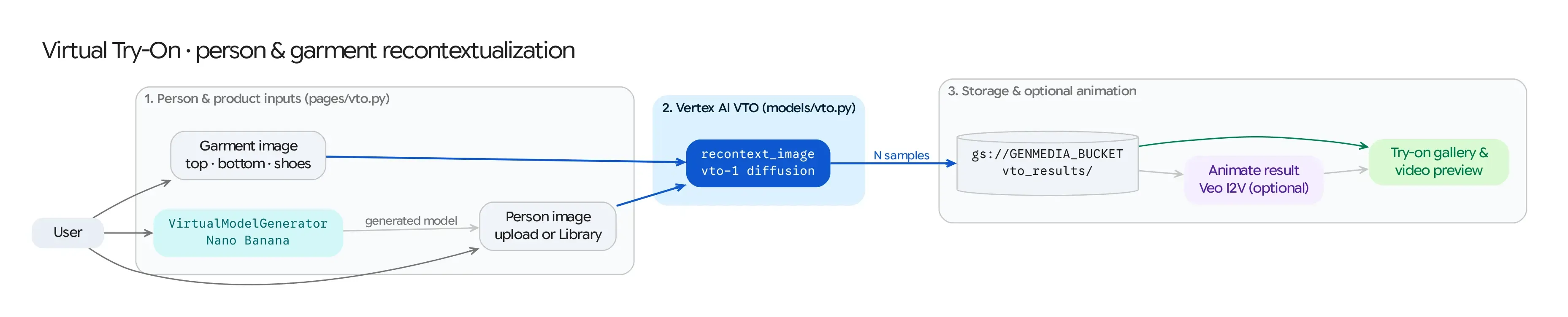
Source Architecture
Section titled “Source Architecture”| Layer | File Path | Responsibility |
|---|---|---|
| Mesop Page & State | pages/vto.py (PageState) |
Person & garment uploaders, synthetic model generator trigger, sample count & seed controls, result gallery, and inline Veo animation. |
| VTO Model Adapter | models/vto.py (generate_vto_image, call_virtual_try_on) |
Wraps client.models.recontext_image() (virtual-try-on-001) and the GAPIC PredictionServiceClient helper for fitting product images onto a person image. |
| Synthetic Model Generator | models/virtual_model_generator.py (VirtualModelGenerator, DEFAULT_PROMPT) |
Generates diverse, studio-lit full-body fashion model portraits (imagen-3.0-generate-002 / Nano Banana) using randomized gender, silhouette, and pose attributes from config/virtual_model_options.json. |
Step-by-Step Pipeline
Section titled “Step-by-Step Pipeline”Step 1: Person Image Selection or Synthetic Model Generation
Section titled “Step 1: Person Image Selection or Synthetic Model Generation”Users can provide the target person portrait (person_image_gcs) in three ways:
- Upload / Library Selection: Upload a full-body or half-body portrait or pick an existing model from the Studio Library.
- Generate Virtual Model (
on_generate_person_image): Click Generate Virtual Model to invokeVirtualModelGenerator, which samples a randomized combination of gender presentation, body silhouette, and camera framing fromconfig/virtual_model_options.jsonand synthesizes a clean studio portrait ready for apparel fitting.
Step 2: Product Garment Selection
Section titled “Step 2: Product Garment Selection”- Upload or select a product garment image (
product_image_gcs)—such as a top, dress, jacket, or bottom—on a flat lay, mannequin, or model.
Step 3: Vertex AI VTO Synthesis (models.recontext_image)
Section titled “Step 3: Vertex AI VTO Synthesis (models.recontext_image)”generate_vto_image()callsclient.models.recontext_image()withmodel=cfg.VTO_MODEL_ID(virtual-try-on-001), passing:source=types.RecontextImageSource(person_image=..., product_images=[types.ProductImage(product_image=...)])config=types.RecontextImageConfig(number_of_images=sample_count, base_steps=base_steps, safety_filter_level=..., person_generation=...)
- Each generated try-on image is uploaded to
gs://<GENMEDIA_BUCKET>/vto_result_images/and logged to Firestore (MediaItemwithmedia_type="vto").
Step 4: Optional Inline Veo Video Animation (on_animate_click)
Section titled “Step 4: Optional Inline Veo Video Animation (on_animate_click)”- Every synthesized VTO result card includes an Animate with Veo button. Clicking it submits the try-on result directly to
models/veo.py(veo-3.1-fast-generate-001,9:16portrait aspect ratio) to render a natural fashion movement clip (result_videoson the same card).