Storyboarder
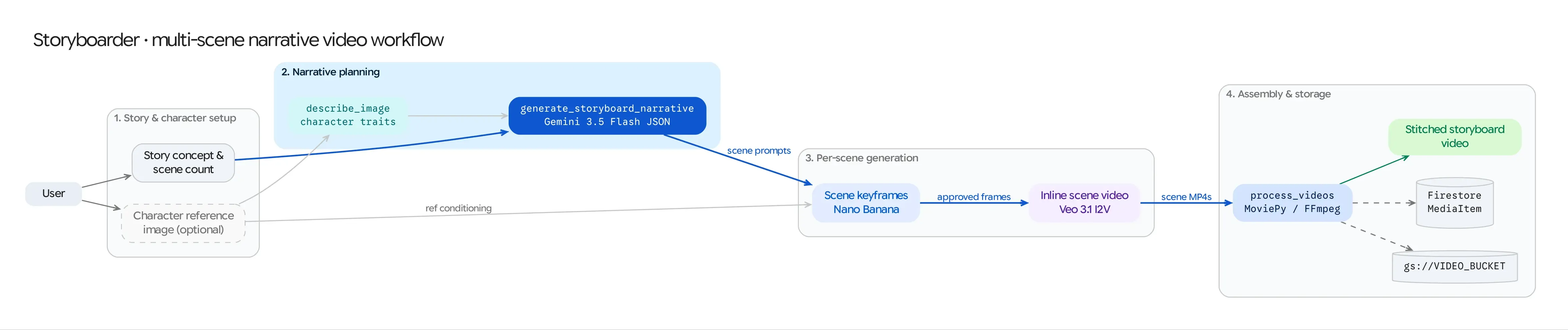
The Storyboarder workflow (/storyboarder) transforms a single story premise and optional character reference photo into a multi-scene short film. It chains Gemini structured narrative planning, Nano Banana sequential keyframe generation, Veo Image-to-Video (I2V) animation, and MoviePy timeline assembly.
Source Architecture
Section titled “Source Architecture”| Layer | File Path | Responsibility |
|---|---|---|
| Mesop Page & Orchestrator | pages/storyboarder.py (PageState, NarrativeStructure, SceneDetail) |
End-to-end 4-stage pipeline UI, per-scene prompt & keyframe editor, individual scene regeneration, Veo video loop, and final MoviePy compilation. |
| Image Synthesis | models/gemini.py (generate_image_from_prompt_and_images) |
Synthesizes 16:9 scene keyframes conditioned on the character asset and previous scene frames. |
| Video Synthesis | models/veo.py (generate_video, VideoGenerationRequest) |
Animates each scene keyframe into an 8s HD video clip with native audio. |
| Video Assembly | models/video_processing.py (process_and_concatenate_videos) |
Concatenates all scene clips into a single master MP4 and uploads it to Cloud Storage. |
Step-by-Step Pipeline
Section titled “Step-by-Step Pipeline”Step 1: Story Concept & Structured Script Generation (NarrativeStructure)
Section titled “Step 1: Story Concept & Structured Script Generation (NarrativeStructure)”- The user enters a Story Concept (or clicks Random Prompt to have Gemini invent one), selects a visual style (e.g., Cinematic, Anime, Claymation, Noir) and aspect ratio (
16:9or9:16), and optionally uploads or selects a Character Reference Image. pages/storyboarder.pycallsclient.models.generate_content()withresponse_schema=NarrativeStructure:class SceneDetail(BaseModel):title: strimage_prompt: strvideo_prompt: strclass NarrativeStructure(BaseModel):overall_style: strscenes: list[SceneDetail]- Gemini outputs a 3-to-5 scene breakdown where each scene has both a static composition prompt (
image_prompt) and a camera/motion prompt (video_prompt).
Step 2: Sequential Character-Aware Keyframe Synthesis
Section titled “Step 2: Sequential Character-Aware Keyframe Synthesis”To maintain visual continuity from scene to scene, Storyboarder generates keyframes sequentially using Nano Banana (gemini-2.5-flash-image / gemini-3.1-flash-image-preview):
- Scene 1: Conditioned on
scene[0].image_prompt+ the user’scharacter_image_gcs(if provided). - Scene $k$ ($k > 1$): Conditioned on
scene[k].image_prompt+character_image_gcs+ the generated keyframe from Scene $k-1$ (previous_scene_image) so lighting, environment, and character wardrobe carry forward. - Users can inspect the storyboard grid, edit any individual
image_prompt, and click Regenerate Image on any single scene before proceeding to video generation.
Step 3: Scene-by-Scene Veo Animation
Section titled “Step 3: Scene-by-Scene Veo Animation”- Clicking Generate Videos for All Scenes iterates through every storyboard card and submits an Image-to-Video (
i2v)VideoGenerationRequestto Veo (veo-3.1-fast-generate-001orveo-3.1-generate-001) using the scene’s keyframe (reference_image_gcs) andvideo_prompt. - Users can also regenerate any individual scene’s video clip independently if they tweak its
video_prompt.
Step 4: MoviePy Master Video Assembly
Section titled “Step 4: MoviePy Master Video Assembly”- Once all scenes have rendered their Veo video clips, clicking Create Final Movie downloads the scene MP4s from GCS, concatenates them in sequence via
models/video_processing.py, uploads the stitched master film togs://<GENMEDIA_BUCKET>/storyboarder_movies/, and logs a completeMediaItemin Firestore.