Veo Video Generation
The Veo workspace (/veo) is GenMedia Creative Studio’s flagship video synthesis environment. It exposes all capabilities of the Vertex AI Veo model family (veo-2.0, veo-3.0, and veo-3.1) through a capability-driven UI backed by asynchronous Long-Running Operation (LRO) polling and an async FastAPI router.
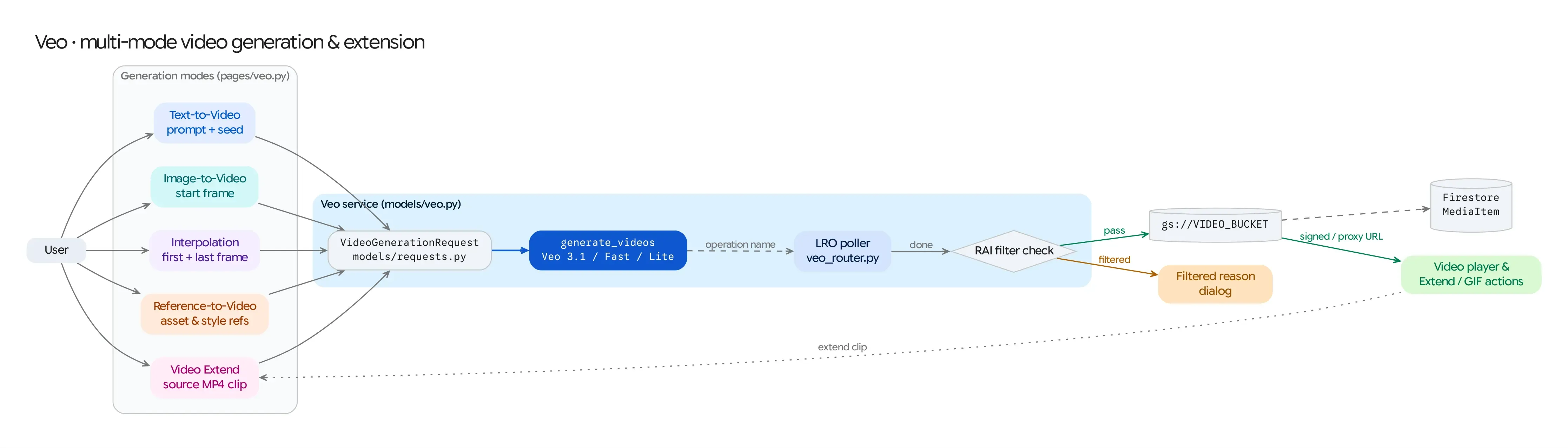
Source Architecture
Section titled “Source Architecture”| Layer | File Path | Responsibility |
|---|---|---|
| Mesop Page & State | pages/veo.py, state/veo_state.py (PageState) |
Multi-mode UI workspace, reference image/video uploaders, camera & cinematography controls, and video player gallery. |
| UI Components | components/veo/generation_controls.py, components/veo/file_uploader.py, components/veo/video_display.py |
Modular mode switchers, dynamic parameter selectors bound to config/veo_models.py, and C2PA provenance viewer. |
| Model Adapter | models/veo.py (generate_video, VideoGenerationRequest) |
Dispatches client.models.generate_videos(), polls LRO completion, stores local byte responses to GCS when needed, and extracts C2PA manifests. |
| Async FastAPI Router | routers/veo_router.py (/api/veo/generate_async, /api/veo/TaskStatus/{task_id}) |
Non-blocking background task execution for long-running video generations. |
| Model Registry | config/veo_models.py (VEO_MODELS, VeoModelConfig) |
Declarative capability registry defining supported modes, aspect ratios, durations, resolutions, audio support, and per-mode overrides for every Veo model. |
Supported Generation Modes
Section titled “Supported Generation Modes”The workspace adapts its upload slots and parameter constraints dynamically based on the active mode (supported_modes in config/veo_models.py):
- Text-to-Video (
t2v): Synthesizes video directly from a descriptive text prompt, negative prompt, and camera direction. - Image-to-Video (
i2v): Animates a single starting reference frame (reference_image_gcs) into a full video clip while preserving the subject and composition. - First & Last Frame Interpolation (
interpolation): Accepts both a starting frame (reference_image_gcs) and an ending target frame (last_reference_image_gcs), synthesizing a smooth cinematic transition between the two keyframes (GenerateVideosConfig.last_frame). - Reference-to-Video (
r2v): Accepts up to 3 character/subjectASSETreference images (r2v_reference_images) and/or aSTYLEreference image (r2v_style_image) viaVideoGenerationReferenceImage, maintaining character identity or visual aesthetic across newly generated scenes. - Video Extension (
extend): Extends an existing Veo video (video_input_gcs) by an additional7ssegment usingveo-3.1-generate-001orveo-3.1-fast-generate-001.
Model Matrix (config/veo_models.py)
Section titled “Model Matrix (config/veo_models.py)”| Version ID | Model Name | Supported Modes | Resolutions | Durations | Native Audio |
|---|---|---|---|---|---|
3.1 (Default) |
veo-3.1-generate-001 |
t2v, i2v, interpolation, r2v (ASSET), extend |
720p, 1080p, 4k |
4s, 6s, 8s (7s on extend) |
Yes |
3.1-fast |
veo-3.1-fast-generate-001 |
t2v, i2v, interpolation, r2v (ASSET), extend |
720p, 1080p, 4k |
4s, 6s, 8s (7s on extend) |
Yes |
3.1-lite |
veo-3.1-lite-generate-001 |
t2v, i2v, interpolation |
720p, 1080p |
4s, 6s, 8s |
Yes |
3.0 / 3.0-fast |
veo-3.0-generate-001, veo-3.0-fast-generate-001 |
t2v, i2v, interpolation |
720p, 1080p |
4s, 6s, 8s |
Yes |
2.0 / 2.0-exp |
veo-2.0-generate-001, veo-2.0-generate-exp |
t2v, i2v, interpolation, r2v (ASSET & STYLE on 2.0-exp) |
720p |
5s–8s |
No |
Generation & LRO Polling Lifecycle
Section titled “Generation & LRO Polling Lifecycle”- Request Validation (
VideoGenerationRequest): Validates prompt presence, resolution (720p/1080p/4k), aspect ratio (16:9or9:16), video count (1–4),person_generationpolicy, deterministicseed, and optionalenhance_prompt/generate_audioflags against the selectedVeoModelConfig. - Vertex AI LRO Submission:
models/veo.pyconstructs atypes.GenerateVideosConfigwithoutput_gcs_uri=cfg.VIDEO_BUCKETand invokesclient.models.generate_videos(model=..., prompt=..., image=..., video=..., config=...). - Polling Loop: The adapter polls
client.operations.get(operation)every 10 seconds untiloperation.doneisTrue. - Post-Processing & Provenance:
- If the API returns inline
video_bytesinstead of ags://URI,models/veo.pyuploads the MP4 bytes directly tocfg.VIDEO_BUCKET. - C2PA Content Credentials: When present in the generated MP4 container, C2PA manifest data is extracted via
common/c2pa_utils.pyand attached to the FirestoreMediaItem(c2pa_manifest) for cryptographic provenance inspection in the UI.
- If the API returns inline