Pixie Compositor
The Pixie Compositor (/pixie_compositor) is GenMedia Creative Studio’s post-production editing suite. It allows creators to take video clips generated in Veo and audio tracks generated in Lyria, Gemini TTS, or Chirp 3 HD and assemble them into finished multi-shot sequences with transitions, layered soundtracks, and animated GIF exports.
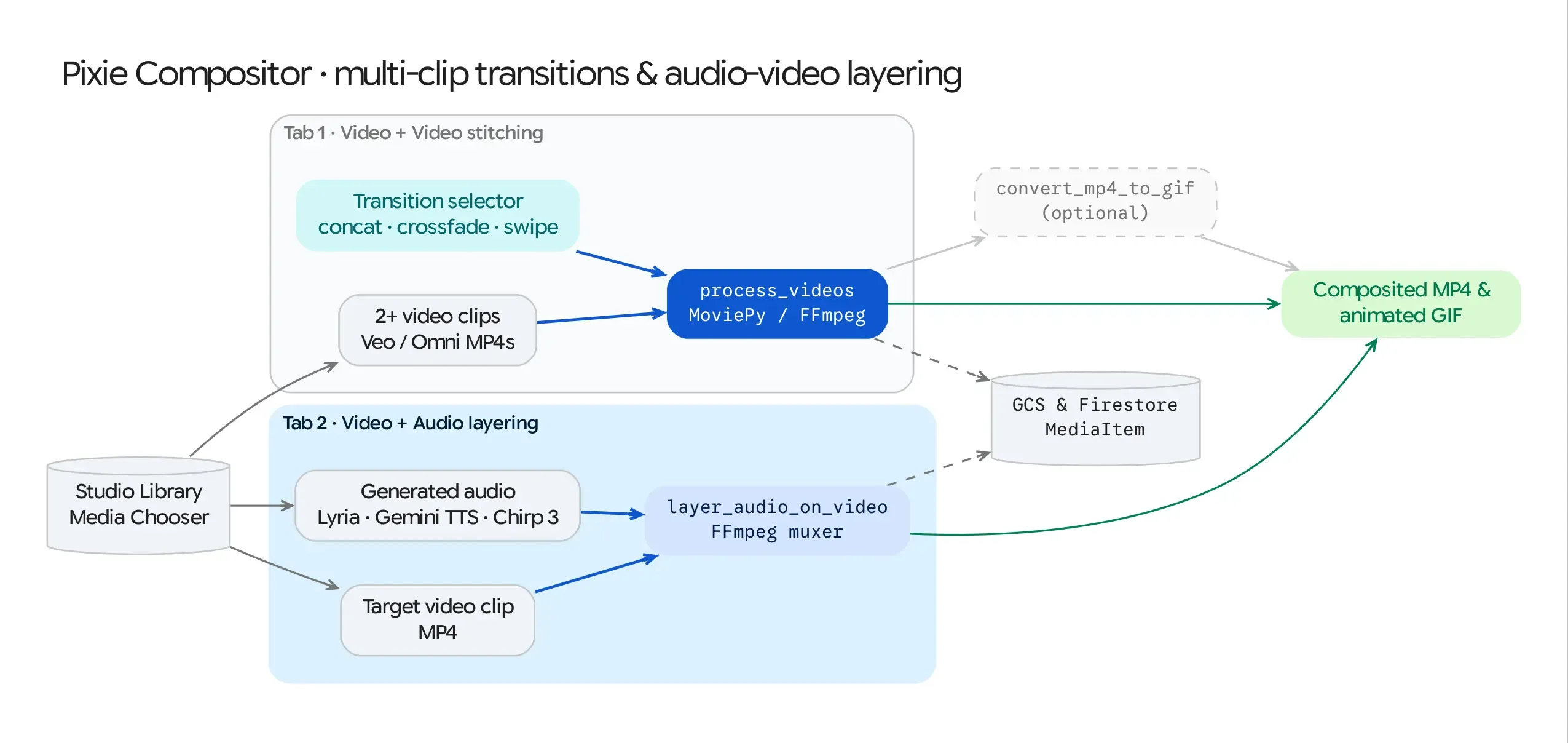
Source Architecture
Section titled “Source Architecture”| Layer | File Path | Responsibility |
|---|---|---|
| Mesop Page & State | pages/pixie_compositor.py (PixieCompositorState) |
Two-tab workspace (Video + Video Concatenation and Video + Audio Layering), Firestore Library media pickers, transition selector, and GIF converter. |
| Video Processing Engine | models/video_processing.py (process_and_concatenate_videos, layer_audio_on_video, convert_mp4_to_gif) |
MoviePy pipeline executing clip concatenation, crossfade/wipe transitions, audio track muxing, and GCS persistence. |
Core Editing Workflows
Section titled “Core Editing Workflows”Tab 1: Multi-Video Concatenation & Transitions (process_and_concatenate_videos)
Section titled “Tab 1: Multi-Video Concatenation & Transitions (process_and_concatenate_videos)”- Clip Selection: Select 2 or more video clips from the Studio Library (queried from Firestore
genmedia_librarywheremime_type == "video/mp4"). - Transition Effect Selection (
selected_transition):- Concatenate (
concat): Hard cut sequence (concatenate_videoclips(clips, method="compose")). - Crossfade (
crossfade): Applies a1.0scrossfadeinoverlap between consecutive clips. - Wipe (
wipe): Applies a directional slide transition (CompositeVideoClipwith horizontal position animation) between clips.
- Concatenate (
- Render & Persist: MoviePy exports the stitched master clip (
libx264,aac,24 fps), uploads it togs://<GENMEDIA_BUCKET>/concatenated_videos/, and logs a newMediaItem(media_type="pixie_compositor").
Tab 2: Video + Audio Track Layering (layer_audio_on_video)
Section titled “Tab 2: Video + Audio Track Layering (layer_audio_on_video)”- Asset Selection: Pick a target Video Clip (
video_to_layer_uri) and an Audio Track (audio_to_layer_uri, such as a 30-second Lyria score or a Gemini TTS voiceover) from the Studio Library. - Audio Muxing:
layer_audio_on_video()loads both assets into MoviePy (VideoFileClipandAudioFileClip), trims the audio to match the video duration if the audio track is longer (audio_clip.subclip(0, video_clip.duration)), binds the audio viavideo_clip.set_audio(audio_clip), and writes the combined MP4 to Cloud Storage.
One-Click MP4-to-GIF Export (convert_mp4_to_gif)
Section titled “One-Click MP4-to-GIF Export (convert_mp4_to_gif)”- Both tabs include a Convert to GIF button on the rendered output video that invokes
convert_mp4_to_gif()(10 fps) and saves the resulting.gifto Cloud Storage for easy embedding in presentations or chat spaces.