Motion Portraits
The Motion Portraits workflow (/motion_portraits) brings still character portraits, headshots, or live webcam selfies to life as living portraits—outputting both high-definition Veo MP4 clips and shareable animated GIFs.
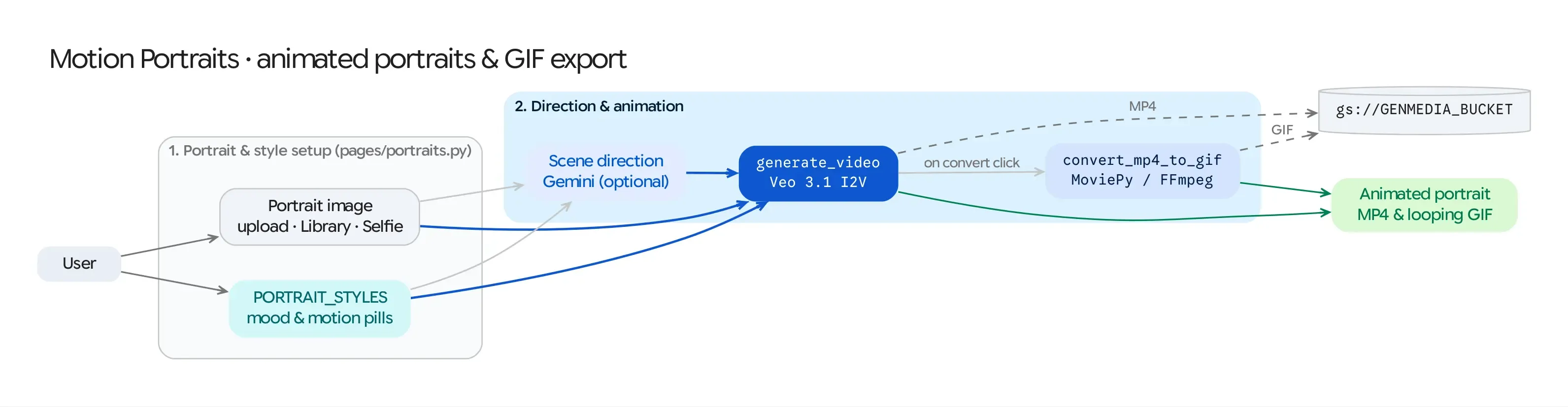
Source Architecture
Section titled “Source Architecture”| Layer | File Path | Responsibility |
|---|---|---|
| Mesop Page & State | pages/portraits.py (PageState, create_scene_direction) |
Portrait uploader, live selfie_camera integration, style modifier chip selector (PORTRAIT_STYLES), Veo model/duration controls, and MP4 + GIF side-by-side output viewer. |
| Webcam WebComponent | components/selfie_camera/selfie_camera.py |
Custom Lit WebComponent capturing a live browser webcam frame and uploading it directly to Cloud Storage. |
| Models & Conversion | models/veo.py, models/video_processing.py (convert_mp4_to_gif) |
Runs Veo Image-to-Video (i2v) and converts the resulting MP4 clip into an optimized looping GIF via MoviePy. |
Step-by-Step Pipeline
Section titled “Step-by-Step Pipeline”Step 1: Portrait Acquisition (3 Sources)
Section titled “Step 1: Portrait Acquisition (3 Sources)”Users can provide the base portrait (reference_image_gcs) via:
- Upload Image: Upload any portrait photograph or digital illustration.
- Choose from Library: Pick an existing portrait generated in Nano Banana or Virtual Try-On.
- Take a Selfie (
selfie_camera): Open the live browser camera dialog, capture a frame, and automatically store it togs://<GENMEDIA_BUCKET>.
Step 2: Style Modifiers (PORTRAIT_STYLES) & Gemini Scene Direction
Section titled “Step 2: Style Modifiers (PORTRAIT_STYLES) & Gemini Scene Direction”- Users can select one or more curated motion & lighting modifiers defined in
config/default.py(PORTRAIT_STYLES, such as subtle head turns, wind in hair, cinematic lighting shifts, or emotional expressions) and/or write custom motion direction. - AI Scene Direction (
create_scene_direction): When the user leaves custom direction open or requests scene expansion, Gemini inspects the uploaded portrait image (types.Part.from_uri) alongside the selected style modifiers and writes a natural, physically plausible camera-and-subject motion prompt that avoids distorting the subject’s face.
Step 3: Veo Image-to-Video Synthesis & Automatic GIF Conversion
Section titled “Step 3: Veo Image-to-Video Synthesis & Automatic GIF Conversion”- Veo
i2vGeneration: SubmitsVideoGenerationRequesttomodels/veo.pywith the portrait asreference_image_gcsand the expanded motion prompt. - MP4-to-GIF Conversion (
convert_mp4_to_gif): Once the Veo MP4 completes,models/video_processing.pyautomatically downloads the clip, renders a looping animated GIF (10 fps) via MoviePy, uploads the GIF to Cloud Storage (gif_url), and records both assets in the FirestoreMediaItem.