Key Concepts
Before diving deep into SCRAPI's features, it helps to have a clear mental model of how things fit together. This page covers the core ideas you'll encounter throughout the documentation — what an App is, how resources relate to each other, how to read a resource name, and how the five eval types differ.
None of this is particularly complicated, but having these concepts clear in your head will make everything else click faster.
The resource hierarchy
CX Agent Studio organizes everything into a hierarchy. Think of it like a set of nesting containers:
GCP Project
└── Location (e.g., "us", "global")
    └── App  ← the top-level container
        ├── Agent(s)  ← the conversational AI itself
        │   ├── Playbooks / Flows
        │   └── Configuration
        ├── Tools  ← external integrations (APIs, functions)
        ├── Guardrails  ← safety and policy constraints
        ├── Callbacks  ← webhook handlers
        ├── Variables  ← shared configuration values
        ├── Sessions  ← individual conversation threads
        ├── Deployments  ← where the App is deployed to
        └── Versions / Changelogs  ← history and snapshots
When you pull an App with cxas pull, you get a local snapshot of all these resources. When you push, SCRAPI updates the platform to match your local files.
What is an App?
An App is the top-level container for everything related to a single conversational agent product. You might have one App for your customer service bot and another for your internal HR assistant.
In the Google Cloud console, Apps appear as distinct entries in CX Agent Studio. Each App has:
- A project (the GCP project it belongs to)
- A location (the region where it's deployed, like
usorglobal) - An app ID (a short identifier like
abc123) - A display name (a human-readable name)
You create Apps through the CX Agent Studio UI. SCRAPI then gives you tools to manage and automate everything inside them.
What is an Agent?
An Agent lives inside an App and is the actual conversational AI. The Agent holds the playbooks, flows, instructions, and configuration that determine how the bot behaves in a conversation.
Most Apps have one primary Agent, but complex setups may have multiple Agents — for example, a main agent that hands off to specialized sub-agents for billing, technical support, or escalation.
When you interact with SCRAPI's Sessions class to send a message, it's the Agent that processes your input and generates a response.
The app_name resource identifier
Many SCRAPI classes and CLI commands ask for an app_name. This is the full resource name of an App — a structured string that uniquely identifies it within Google Cloud:
For example:
This format is consistent with how Google Cloud APIs identify resources, and SCRAPI uses it throughout because it's unambiguous — it encodes the project, location, and App ID all in one string.
Where do I find my app_name?
Run cxas apps list --project_id YOUR_PROJECT --location us to see the full app_name for each App. Or in Python: app_client.list_apps() returns objects with a .name attribute containing the full resource name.
Similarly, individual resources within an App follow the same pattern. For example, a Tool's full name looks like:
The five evaluation types
SCRAPI supports five distinct types of evaluations, each designed to test a different aspect of your agent's behavior:
-
Platform Goldens
Test cases defined and run on the CX Agent Studio platform itself. SCRAPI can push golden test cases to the platform and retrieve results. Good for regression testing full conversation flows.
-
Local Simulations
Simulate multi-turn conversations locally without hitting the live platform. SCRAPI steps through a scripted conversation and checks that the agent's responses match expectations at each turn. Fast and cheap to run.
-
Tool Tests
Call your agent's tools directly and assert on the outputs. Useful for verifying that tool integrations (APIs, databases, functions) return the right structure and values for given inputs.
-
Callback Tests
Test webhook callbacks — the server-side functions your agent calls during a conversation. Verify that callbacks receive the right inputs and return valid responses.
-
Turn Evals
Evaluate individual conversation turns using LLM-based scoring. Instead of exact-match assertions, Turn Evals use a language model to judge whether the agent's response was appropriate, accurate, and helpful.
The linter
The SCRAPI linter is a static analysis tool — it inspects your agent configuration files without running the agent or making API calls. Think of it like a spell checker, but for agent configs.
It works by running your pulled YAML files through a set of rules. Each rule checks for a specific pattern or property — things like "does every tool have a description?" or "is the agent's system prompt too long?". SCRAPI ships with 60+ rules across several categories:
| Category | What it checks |
|---|---|
config | Global configuration settings and structure |
agent | Agent-level properties and instructions |
tool | Tool definitions, schemas, and descriptions |
guardrail | Safety and policy constraint configuration |
callback | Webhook and callback handler configuration |
structure | File and directory layout |
Rules are identified by a short code (like T001 for a tool rule or A003 for an agent rule). You can configure which rules are active, and at what severity, using a cxaslint.yaml file in your project directory.
The skills system
Skills are a system for extending SCRAPI with AI-powered automation. A skill is essentially a set of instructions (a prompt) and tool bindings that teach an AI assistant how to perform a specific agent development task using SCRAPI's API.
Think of skills like plugins. You install a skill, and then the AI assistant connected to your SCRAPI project gains the ability to do that task autonomously — build an agent from a description, run and interpret evaluations, debug a failing test, and so on.
SCRAPI's built-in skills include:
| Skill | What it does |
|---|---|
cxas-agent-foundry | Composite skill for the full agent lifecycle — builds agents from requirements, runs evaluations, and debugs failures. Routes to internal build, run, and debug sub-skills as needed. |
cxas-sim-eval | Converts and runs simulation evaluations |
The "create on platform, edit locally" workflow
One of the most important things to understand about SCRAPI is its intended workflow. SCRAPI does not replace the CX Agent Studio UI — it complements it.
Here's the intended pattern:
-
Create resources on the platform. Use the CX Agent Studio UI to create a new App, Agent, or Tool. The platform is the source of truth.
-
Pull them locally with
cxas pull. This downloads your resources as YAML files that you can read, edit, and version control. -
Edit locally. Make your changes in your editor of choice. Use the linter (
cxas lint) to catch problems early. -
Push back with
cxas push. Your local changes are applied back to the platform. -
Test. Run evaluations (
cxas test-tools,cxas test-callbacks, etc.) to verify correctness. -
Repeat. Optionally, use
cxas branchto create an experimental branch of your App before making big changes.
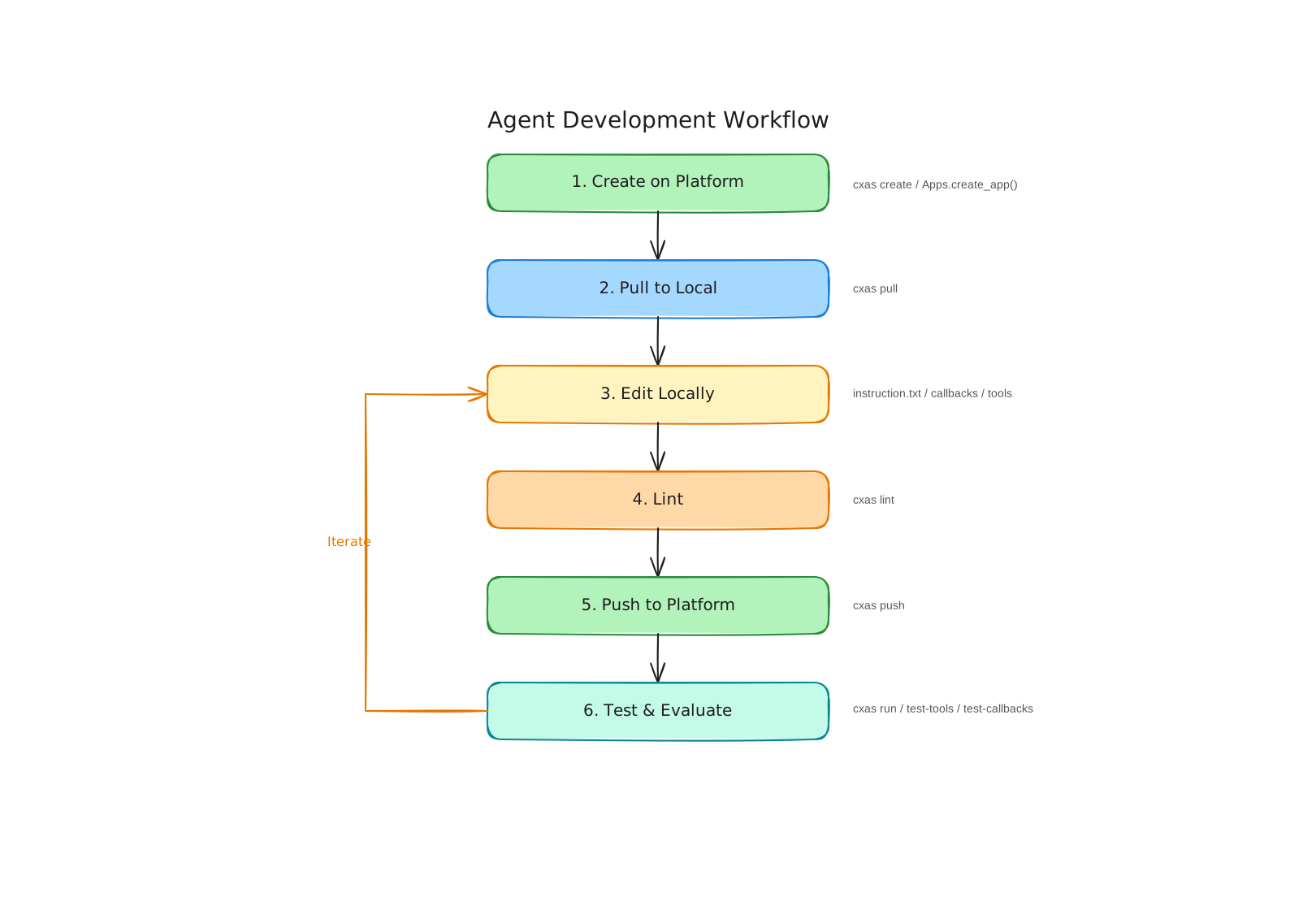
This workflow means you get the best of both worlds: the visual, interactive experience of the platform UI for designing and creating agents, plus the power of local tooling — version control, code review, CI/CD, and SCRAPI's automation features — for maintaining and scaling them.
What's next?
You now have a solid foundation. Here are some good places to go deeper:
- Agent Development Guide — pull/push workflow, managing resources, branching
- Evaluation Guide — all five eval types in detail
- Linting Guide — configuring and customizing lint rules
- Linting Guide — Static analysis and best-practice checks