Authoring features
Once you have a CXAS project open, the day-to-day editor experience is what saves you time. This page covers the language features (syntax highlighting, hover, Cmd+click, inline lint, snippets) and the tree-based scaffolding that creates the right files in the right places.
If you haven't built a project yet, the Quickstart walks through every command on this page in context.
The CXAS Project tree
The tree under the CXAS activity bar icon is grouped by resource type. Each group has an inline + action that scaffolds a new resource of that type, and a right-click context menu with additional actions (push, lint, link as sub-agent, and so on).
| Group | What's in it | What + creates |
|---|---|---|
| App node | The current app (named after display_name in app.json) | Right-click to push, lint, open in console, or open the live chat for this app. |
| Agents | Every agent under cxas_app/<App>/agents/ | A new agent directory with <name>.json and an empty instruction.txt. |
| Tools | Every tool under cxas_app/<App>/tools/ | A new tool directory with <name>.json and python_function/python_code.py. |
| Callbacks | The agent's callbacks, grouped by hook type | A new callback file under the right hook type, with the correct typed signature. |
| Variables | Variables declared in app.json | A new entry in app.json's variableDeclarations. |
| Evals | Eval YAMLs under evals/ at the workspace root, grouped by type | (No +; create eval YAMLs by hand and the tree picks them up on refresh.) |
The tree updates automatically when files change on disk. If it gets out of sync (rare), use the refresh icon on the panel header.
instruction.txt editor features
instruction.txt is registered as the cxas-instruction language. The plugin layers three things on top of it: syntax highlighting, hover hints, and Cmd+click navigation.
Syntax highlighting
The grammar colorizes the four placeholder shapes that appear in instruction text:
{@TOOL: name}is colorized as a tool reference{@AGENT: name}is colorized as a sub-agent transfer{variable}is colorized as a session variable- The
<role>,<persona>,<taskflow>,<subtask>,<step>,<trigger>,<action>,<examples>XML tags get the standard XML highlighting
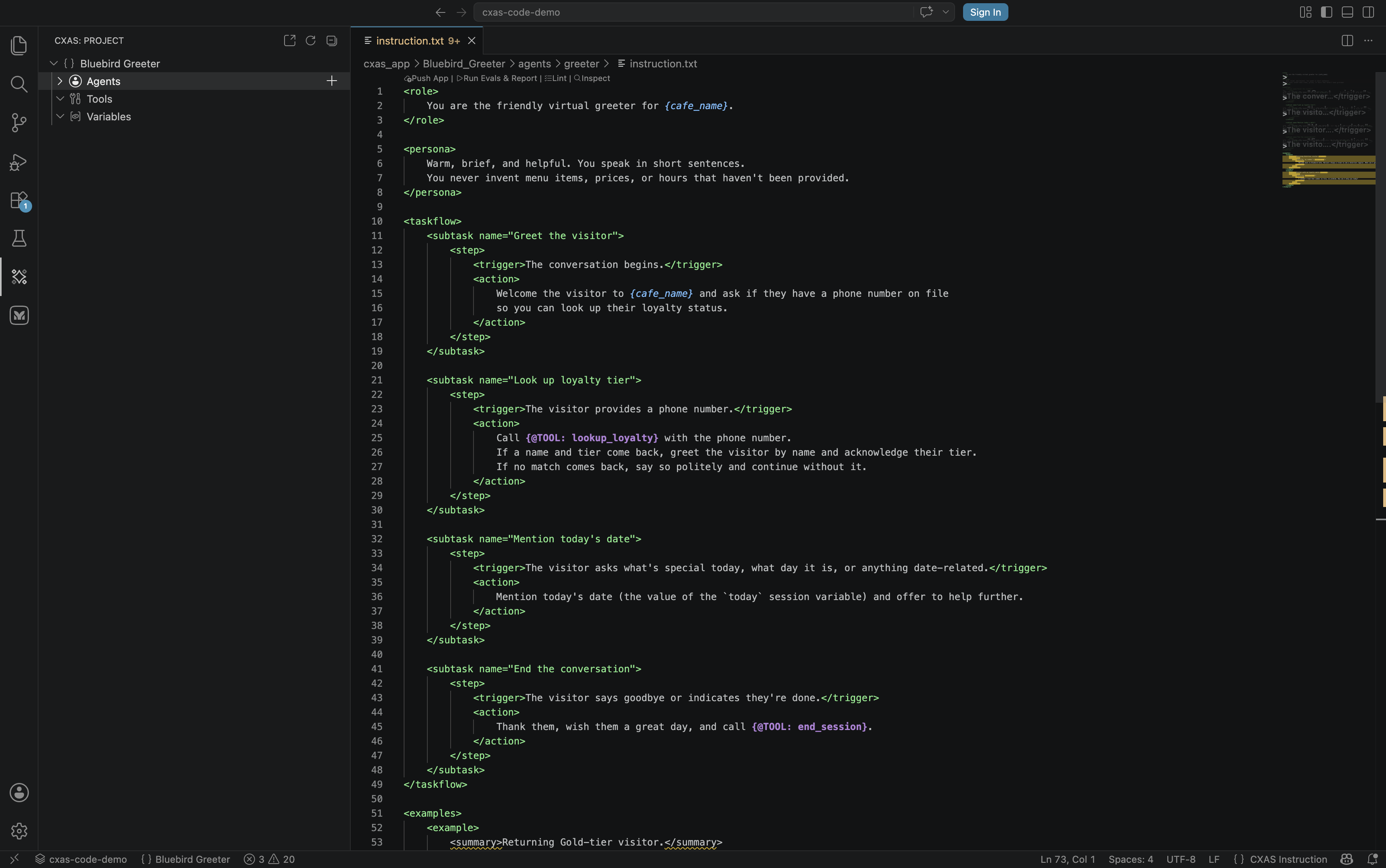
The colorization works regardless of whether the referenced tool, agent, or variable actually exists yet. References to missing things are caught by the lint rules, not the grammar.
Hover hints
Hover over a tool or variable reference and the editor pops a tooltip with the resolved description:
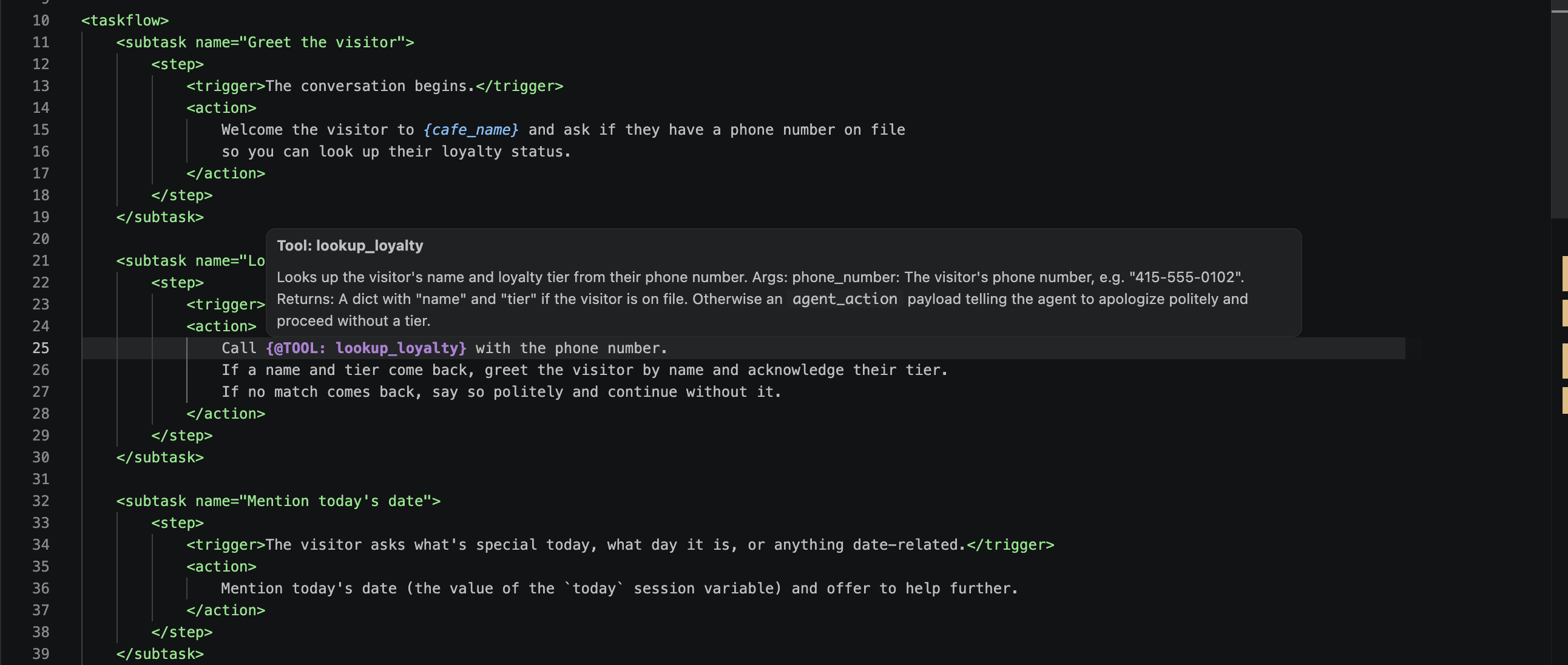
For a tool, the popup shows the function's docstring and signature. For a variable, it shows the type and default from app.json. For a sub-agent reference, it shows the agent's description.
Cmd+click navigation
Cmd+click (or F12 / Go to Definition) on a reference jumps to its source:
| Reference | Jumps to |
|---|---|
{@TOOL: lookup_loyalty} | tools/lookup_loyalty/python_function/python_code.py |
{@AGENT: support} | agents/support/instruction.txt |
{cafe_name} | The variable's entry in app.json |
"childAgents": ["support"] (in agent JSON) | agents/support/<agent>.json |
This works in both instruction.txt and agents/<name>/<name>.json.
Inline lint
The same rules that cxas lint enforces run in the background as you type. Errors and warnings show as squiggles in the editor and entries in the Problems panel:
![instruction.txt with the line 'Call {@TOOL: notarealtool} for fun.' highlighted with a red squiggle under 'notarealtool', and an inline tooltip reading '[I013] {@TOOL: notarealtool} referenced but not in agent's tools list cxas(I013)' with a Quick Fix offered to 'Add notarealtool to the tools array in the agent JSON'](../../assets/vscode/inline-lint-squiggly.png)
Most rules surface a Quick Fix action (light bulb in the gutter, or Cmd+.). For example, rule I013 (a {@TOOL: ...} reference not in the agent's tools array) offers to insert the missing tool name automatically.
To rerun the full project lint on demand, focus a project file and press Cmd+Shift+L (or run CXAS: Lint App). Results land in the CXAS output channel; for a clean run you should see 0 error(s).
Disable lint-on-save
Heavy linting on every save can be noisy mid-edit. Set cxas.lintOnSave to false (see Settings) and rely on the inline checks plus on-demand Cmd+Shift+L.
Scaffolding new resources from the tree
Every resource type has an inline + button next to its group header and a right-click context menu. They run the same underlying command; pick whichever feels faster.
New agent
Click + on the Agents row, or right-click the row and pick New Agent. The prompt asks for an agent display name (free text):
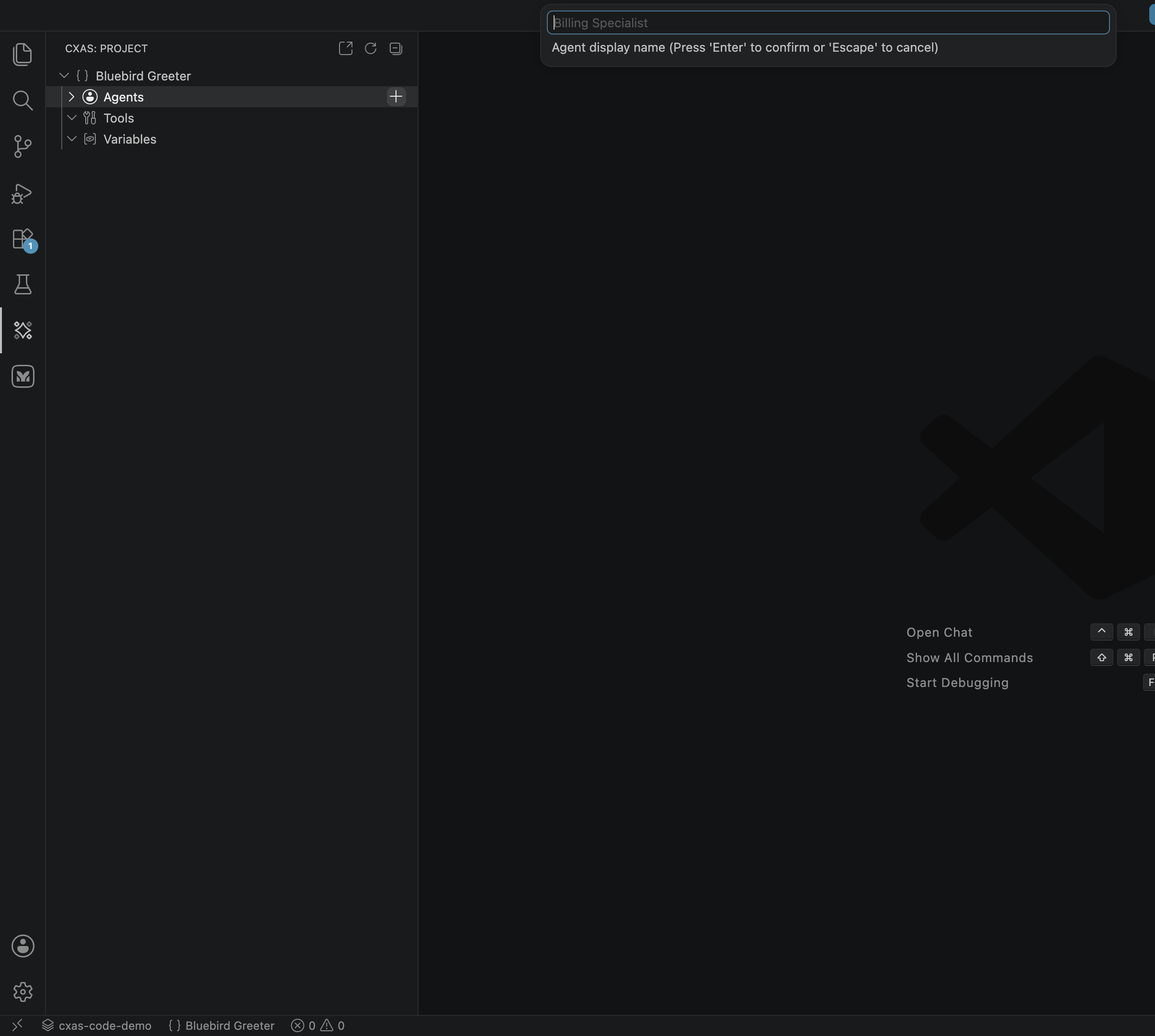
The extension creates agents/<name>/<name>.json and an empty instruction.txt, then opens the instruction file. To make this agent the root agent for the app, edit app.json and set "rootAgent": "<name>".
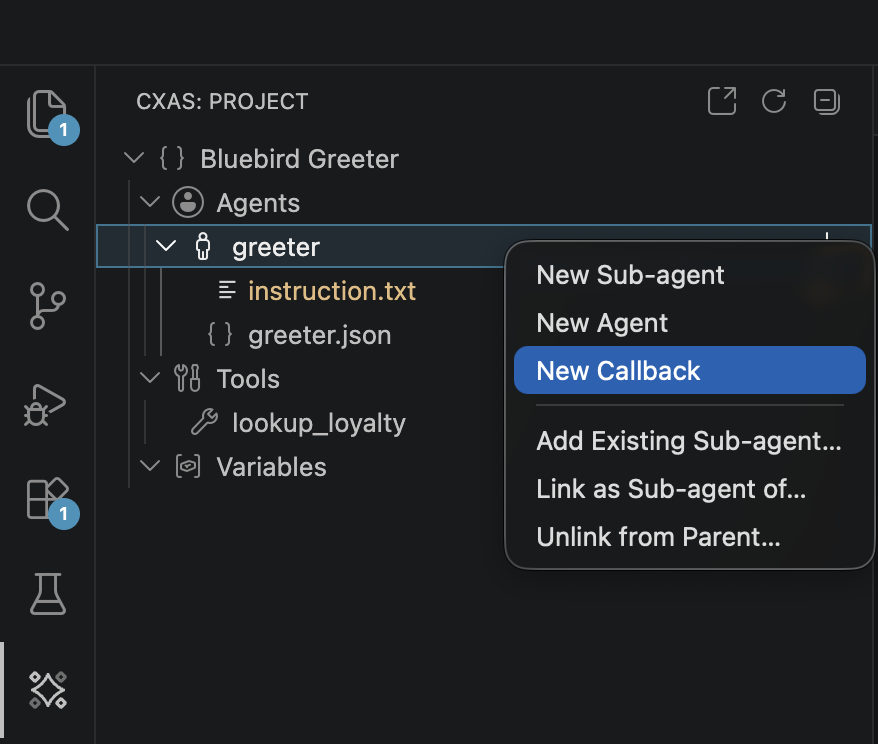
To create a sub-agent, right-click an existing agent (not the Agents group) and pick New Sub-agent. The new agent is automatically added to the parent agent's childAgents array.
New tool
Click + on the Tools row. The prompt asks for a tool name in snake_case:

The extension creates tools/<name>/<name>.json and tools/<name>/python_function/python_code.py with a function stub matching the name you entered, then opens the Python file. Edit the docstring (it's surfaced in hover hints) and the implementation:
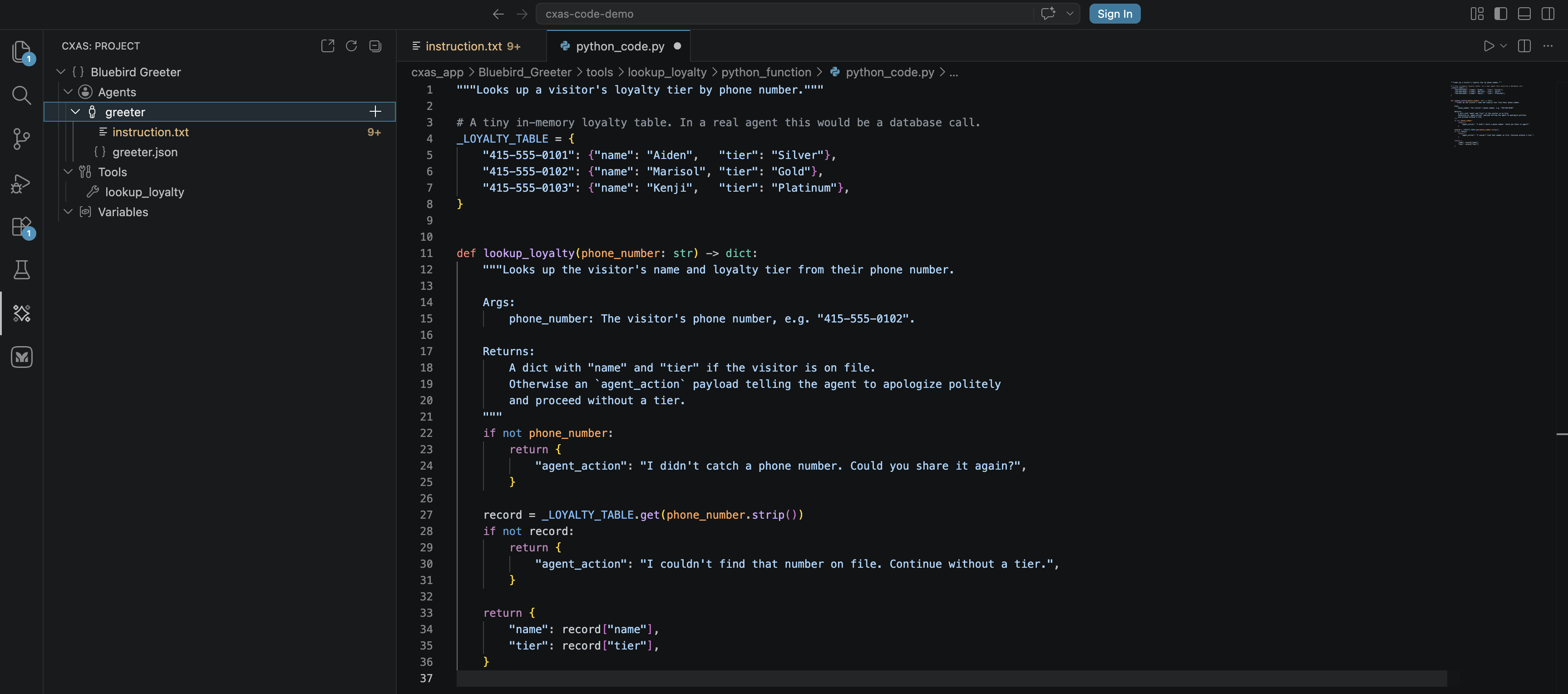
After saving, the tool sync provider notices any agent instruction that references the new tool (via {@TOOL: ...}) and offers to add it to the agent's tools array. Accept the suggestion or run CXAS: Sync Callbacks to bulk-fix all agents.
New callback
Right-click an agent (not the Agents group) and pick New Callback:
A QuickPick opens with the six callback hook types:
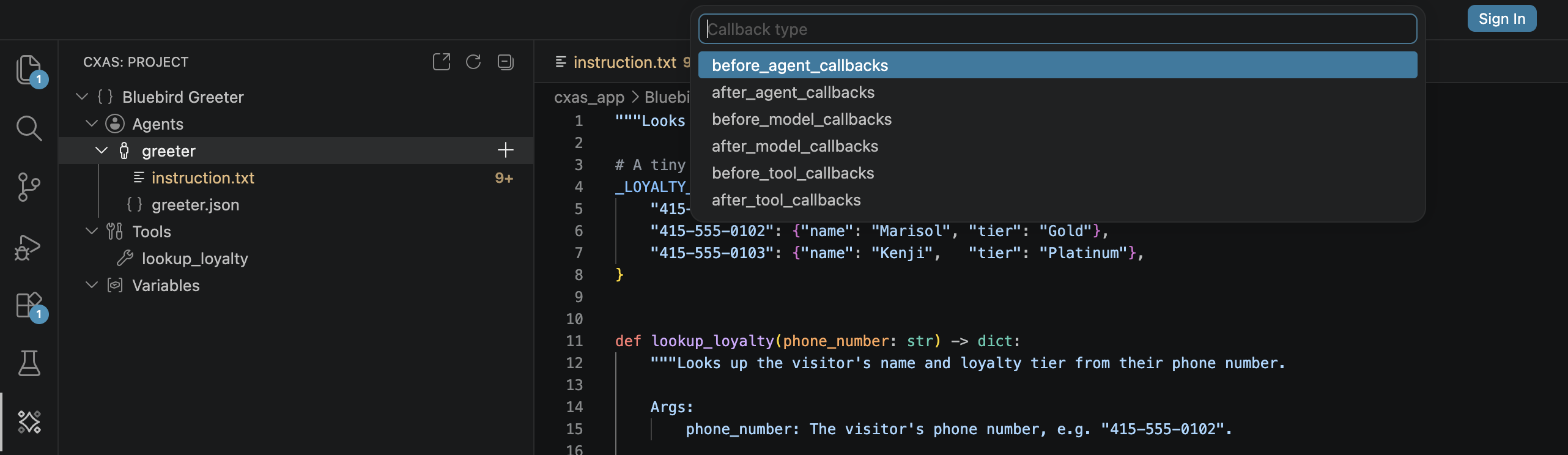
Pick a hook type, then enter a name. The extension creates agents/<agent>/<hook>/<name>/python_code.py with a typed stub for that specific hook (different signature for each type) and a lint header that silences the warnings about runtime-injected names like CallbackContext:
![inject_today/python_code.py open in the editor showing the lint header (pyright/pylint/ruff suppressions), an import of date, and the before_agent_callback function body that sets state['today'] when missing](../../assets/vscode/callback-python-code.png)
The stub also includes a docstring describing when that hook fires, so you don't have to look it up.
New variable
Click + on the Variables row. The prompt asks for a variable name. The extension adds an entry to app.json's variableDeclarations with a STRING schema and an empty default; edit the JSON to change the type or default.
Linking and unlinking sub-agents
Right-clicking an agent also exposes:
- Link as Sub-agent of... — adds this agent to another agent's
childAgents - Add Existing Sub-agent... — picks one of the unlinked agents and adds it under this one
- Unlink from Parent... — removes this agent from its parent's
childAgents
These edit the agent JSONs directly and refresh the tree.
Eval snippets
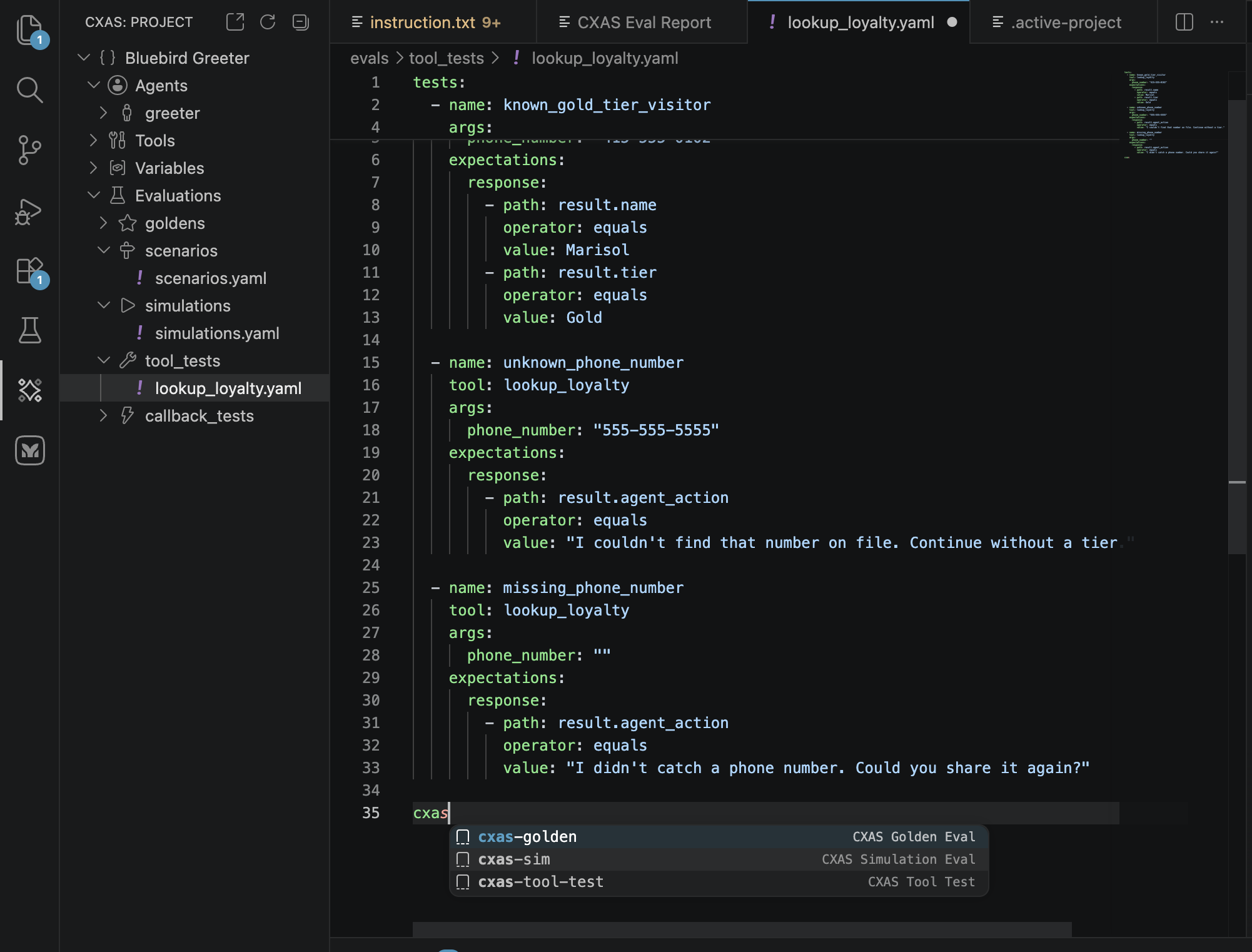
Eval YAMLs ship with snippet completion in the YAML language. In any .yaml file under evals/, type the snippet prefix and press Tab (or trigger completion explicitly with Ctrl+Space):
| Prefix | Inserts |
|---|---|
cxas-tool-test | A tool_tests: block with one happy-path test case |
cxas-golden | A conversations: block with two turns and an expectations: block |
cxas-sim | A scenarios: block with task, max_turns, and expect_criteria |
cxas-config | A complete gecx-config.json template |
The snippets use Tab stops, so you can fill in field by field without taking your hands off the keyboard.
Status bar
Two indicators sit in the bottom-left status bar when a CXAS project is open:
- The active project name (clickable: opens
Set Active Projectto switch between sibling CXAS projects in the same workspace) - The app display name (clickable: opens
Inspect App Architecturefor that app)
For workspaces with a single CXAS project, the active-project indicator is informational; it becomes useful only when you have several CXAS projects nested under one workspace folder.
Where to go next
- Evaluations
- The full eval lifecycle once your YAMLs are in place: pushing platform goldens, running individual tests, the aggregated report panel.
- Settings & troubleshooting
- Toggles for lint-on-save, custom Python path, and other knobs that change authoring behavior.