Team Collaboration
When more than one person is editing the same agent, the platform alone isn't enough. The platform stores a single live state, and any push overwrites whatever was there before. The fix is the same one most teams already use for application code: keep the source of truth in Git, collaborate via pull requests, and promote tested changes through a chain of CES apps.
This page explains a recommended setup for that: how to structure the Git repository, how to handle PRs, and how to wire up a main → testing → prod promotion path on top of it.
Why Git, not just the platform
The platform's draft state is mutable and shared. If two people work on the same app at the same time, the second cxas push wins and the first person's edits are silently lost.
Pulling the app into a Git repository fixes this:
- Every change is reviewable via PR before it lands on the shared environment
- Conflicts surface during
git merge, where they're easy to reason about, instead of as silent overwrites - You get full history, blame, and rollback for every instruction tweak and tool change
- CI can lint, test, and even spin up a temporary CES app for each PR (see
cxas ci-test)
The rule of thumb: the Git repository is the source of truth, the CES apps are deployment targets.
Recommended repository layout
A typical multi-developer project looks like this:
my-agent-repo/
├── .github/
│   └── workflows/
│       └── test_root.yml          # Generated by cxas init-github-action
├── my-support-agent/              # The agent directory (what cxas pull produced)
│   ├── app.json
│   ├── agents/
│   │   └── root/
│   │       ├── instruction.txt
│   │       ├── root.json
│   │       └── before_model_callbacks/
│   ├── tools/
│   │   └── lookup_order/
│   │       ├── lookup_order.json
│   │       └── python_function/
│   │           └── python_code.py
│   └── evaluations/
├── Dockerfile                     # Generated by cxas init-github-action
└── requirements.txt
The my-support-agent/ subdirectory is what cxas pull writes (see Pull & Push Workflow). Every CXAS command in this guide uses --app-dir my-support-agent to point at it.
To bootstrap a new repo from an existing app:
mkdir my-agent-repo && cd my-agent-repo
git init

cxas pull "My Support Agent" \
  --project-id my-gcp-project \
  --location us-central1 \
  --target-dir .

git add .
git commit -m "Initial pull from main app"
cxas pull creates a directory named after the app's display name, with non-filesystem-safe characters sanitized (e.g. My Support Agent becomes My_Support_Agent, [demo] greeting becomes _demo__greeting). Use whatever name actually lands on disk wherever this guide says my-support-agent/.
Day-to-day developer workflow
Each developer follows the same fork-branch-PR loop you'd use for any application code. Nothing about CES changes the model.
# 1. Pick up the latest main
git checkout main
git pull

# 2. Make a feature branch
git checkout -b feature/improve-greeting

# 3. Refresh the agent directory from CES
#    (catches anything edited via the console since the last commit)
cxas pull "My Support Agent" \
  --project-id my-gcp-project \
  --location us-central1 \
  --target-dir .

# 4. Edit instructions, tool code, callbacks
# ...

# 5. Lint before pushing anywhere
cxas lint --app-dir my-support-agent

# 6. Commit and open a PR
git add my-support-agent/agents/root/instruction.txt
git commit -m "Tighten the greeting subtask"
git push -u origin feature/improve-greeting
gh pr create
Note that no developer pushes to a shared CES app from their laptop. Local edits live in the Git branch until the PR merges. The merge to main is what triggers a deploy, covered in the next section.
Refresh before you edit
Always run cxas pull at the start of a feature branch, even if you pulled yesterday. Anyone with console access can change the live app at any time, and cxas pull is how you bring those changes into Git so you don't accidentally overwrite them on push.
Per-PR test environments
The cxas ci-test command spins up a throwaway CES app for the PR's branch, runs tool tests and evaluations against it, and exits with a clear pass/fail signal. Pass --display-name "[CI] PR-<number>" so re-runs on the same PR overwrite the previous attempt instead of leaking apps.
Generate the matching GitHub Actions workflow with:
cxas init-github-action \
  --app-dir my-support-agent \
  --agent-name root \
  --workload-identity-provider "projects/123/locations/global/workloadIdentityPools/gh/providers/gh" \
  --service-account "ci@my-gcp-project.iam.gserviceaccount.com" \
  --project-id my-gcp-project \
  --location us-central1
This drops a workflow at .github/workflows/test_root.yml that runs on every pull request. The relevant call inside it is:
cxas ci-test --app-dir my-support-agent \
  --project-id my-gcp-project \
  --location us-central1 \
  --display-name "[CI] PR-${{ github.event.pull_request.number }} Root"
Reviewers see the test results directly on the PR, and the cleanup workflow (also generated by cxas init-github-action) removes the temp app when the PR closes.
Promotion path: main → testing → prod
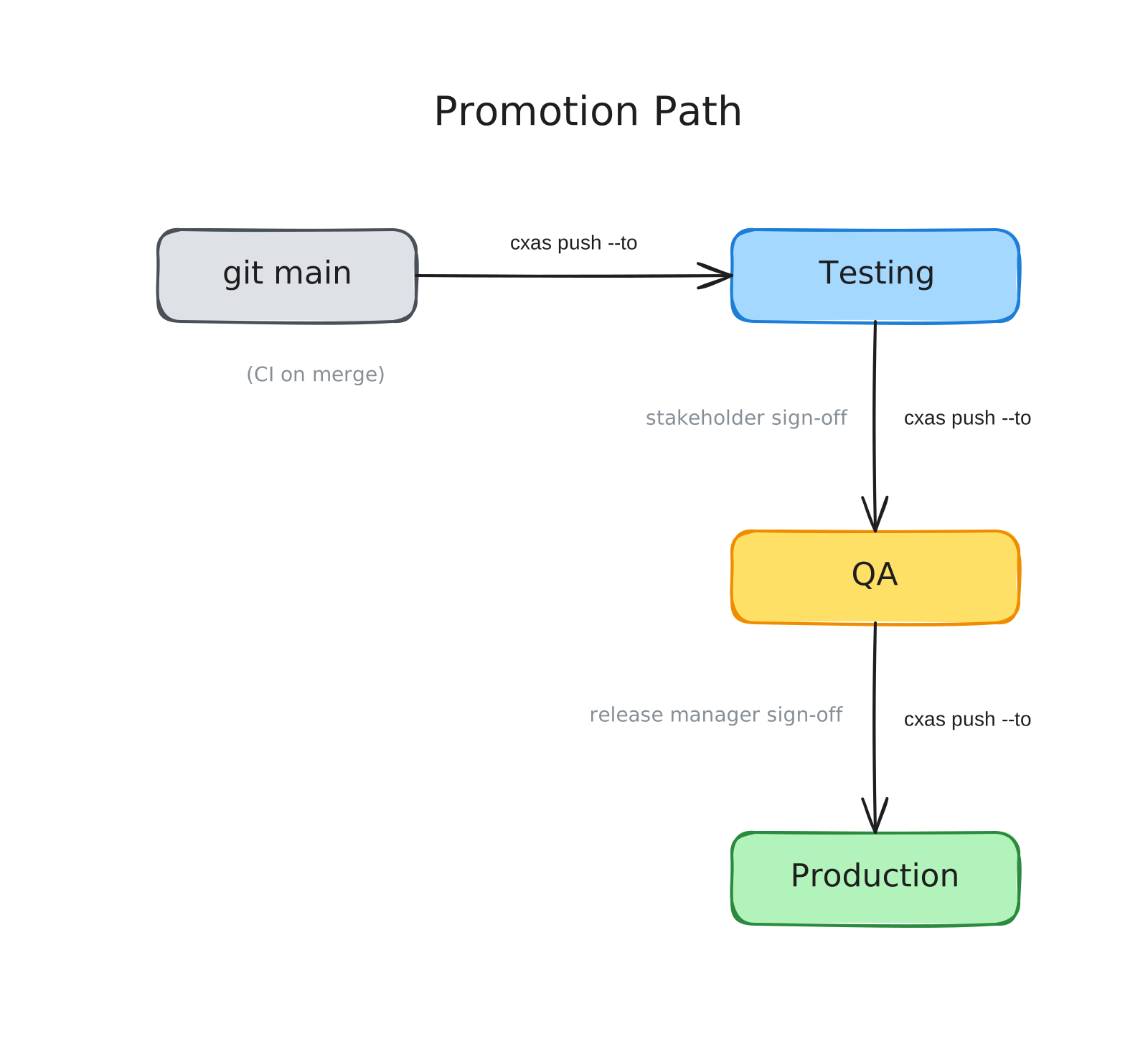
Each stage in the promotion chain is its own CES app. The Git main branch is the source of truth for every stage; the difference between them is just which app you push to and when.
A common three-stage chain:
| Stage | CES app | Who pushes here | When |
|---|---|---|---|
main | My Support Agent (Testing) | CI on merge to main | Every merged PR |
testing | My Support Agent (QA) | Manual promotion | When stakeholders sign off |
prod | My Support Agent (Production) | Manual promotion, gated on QA sign-off | After QA passes |
The flow looks like this:
Setting up the chain
Use cxas branch to seed each stage as an exact copy of the one above it. This guarantees identical configuration on day one (schema, variables, channel profile, everything), so the only thing that ever varies later is what you intentionally promote.
# Start from your main testing app and seed the rest
cxas branch "My Support Agent (Testing)" \
  --new-name "My Support Agent (QA)" \
  --project-id my-gcp-project \
  --location us-central1

cxas branch "My Support Agent (QA)" \
  --new-name "My Support Agent (Production)" \
  --project-id my-gcp-project \
  --location us-central1
Each cxas branch prints the new app's full resource name (projects/.../locations/.../apps/<uuid>). Save those; you'll use them as --to targets when promoting.
Promoting from one stage to the next
Once the apps exist, promotion is a single cxas push --to. You pull the upstream stage into the repo, then push the same local directory to the next stage's resource name:
# Pull whatever is currently on Testing
cxas pull "My Support Agent (Testing)" \
  --project-id my-gcp-project \
  --location us-central1 \
  --target-dir .

# Promote it to QA (use whatever directory name cxas pull just produced)
cxas push \
  --app-dir "<directory-from-pull>" \
  --to projects/my-gcp-project/locations/us-central1/apps/my-support-agent-qa
The exact same pattern promotes QA to Prod; only the --to resource name changes.
Pull before you promote
Always pull the source stage immediately before promoting. Otherwise you risk pushing a stale local copy from a previous session and overwriting fixes that landed in between.
Wiring the testing push into CI
The merge-to-main push to the Testing app is fully automatable. Add a job that runs on push to main:
# .github/workflows/deploy_main.yml
on:
  push:
    branches: [main]

jobs:
  push-to-testing:
    runs-on: ubuntu-latest
    steps:
      - uses: actions/checkout@v4
      - run: cxas lint --app-dir my-support-agent
      - run: |
          cxas push --app-dir my-support-agent \
            --to projects/my-gcp-project/locations/us-central1/apps/my-support-agent-testing
QA and Prod promotions typically stay manual (they're release events, not commits) and run as a workflow_dispatch job that the release manager triggers from the GitHub UI.
Choosing how many stages you need
Three stages is a starting point, not a rule. Pick the minimum that gives you the safety you need:
- Two stages (
main → prod) - Solo developer, low traffic, easy to roll back. Skip the testing tier; trust the per-PR
ci-testruns. - Three stages (
main → testing → prod) - Small team, no dedicated QA. Use the testing tier as a soak environment where stakeholders try the agent before it ships.
- Four stages (
main → testing → qa → prod) - Multiple teams, regulated industry, or anything where a bad agent in production is expensive. Each stage has a clear owner and gate.
The stage count is independent of the Git workflow; main is still the only Git branch that promotes anywhere, regardless of how many CES apps sit downstream of it.
Handling drift between stages
Drift is when a stage's CES app no longer matches what's in Git. This happens when someone edits a downstream app directly in the console, usually for a fast hotfix on prod.
To recover, pull the drifted stage into a scratch directory and diff it against the repo:
# Pull prod into a scratch dir
cxas pull "My Support Agent (Production)" \
  --project-id my-gcp-project \
  --location us-central1 \
  --target-dir /tmp/prod-snapshot

# Diff against the version tracked in Git
# (replace the snapshot subdir with whatever cxas pull produced)
diff -r my-support-agent /tmp/prod-snapshot/<directory-from-pull>
If the change in prod is one you want to keep, copy it into your working tree, commit it to main, and let it propagate forward through the normal promotion path. If it's not, push from main to overwrite prod.
The general principle: never let a stage drift for long. Either bring the change back into Git or wipe it. Drift compounds, and within a few weeks no one remembers which version of the instruction is the "real" one.
Tips and considerations
- Don't share credentials between stages
- Use a separate service account for each CES app, or at minimum scope the deployment service account to one project per stage. This contains the blast radius of a compromised CI token.
- Tag releases in Git
- When you promote to prod, tag the commit (
git tag prod-2026-05-12). It's the cheapest way to know later which Git SHA is currently live. - Variables are per-app
cxas branchcopies the variable declarations but the values stay bound per-app. Double-check that each stage has the right values for its environment after seeding.- Deployments don't get copied
- As with any branch operation, deployments aren't carried over. Set up deployments on each stage separately, then leave them alone.
- The
mainbranch is sacred - Protect it on GitHub. Require PR review and passing checks. Everything downstream (testing, qa, prod) assumes that whatever is on
mainhas already been linted, reviewed, and tested.